A SIN scanner finds Social Insurance Numbers by shape and check digit. Microsoft's definition uses nine digits with optional hyphens or spaces, a passing checksum and, for high confidence, a SIN keyword or a word such as "date of birth" nearby4. VellumSoft's Canadian identifiers include the SIN, validated with the Luhn check. Private businesses generally need a SIN only for income reporting1, so a copy outside payroll and tax records needs a reason to be kept.
What a SIN looks like to a scanner
A SIN has a structure that tools can test. Microsoft's data loss prevention catalogue describes it as "nine digits with optional hyphens or spaces" and lists a checksum as part of the definition4. Its high-confidence rule needs the number, a passing checksum and, within 300 characters, either a SIN keyword or a supporting word such as "date of birth"4.
Plenty of nine-digit strings sit in ordinary files (invoice numbers, phone numbers without punctuation, account references), and a check digit test is one way a tool tells them apart from a SIN. VellumSoft validates SINs with the Luhn check, meaning a number has to pass that check digit test before it counts as a SIN.
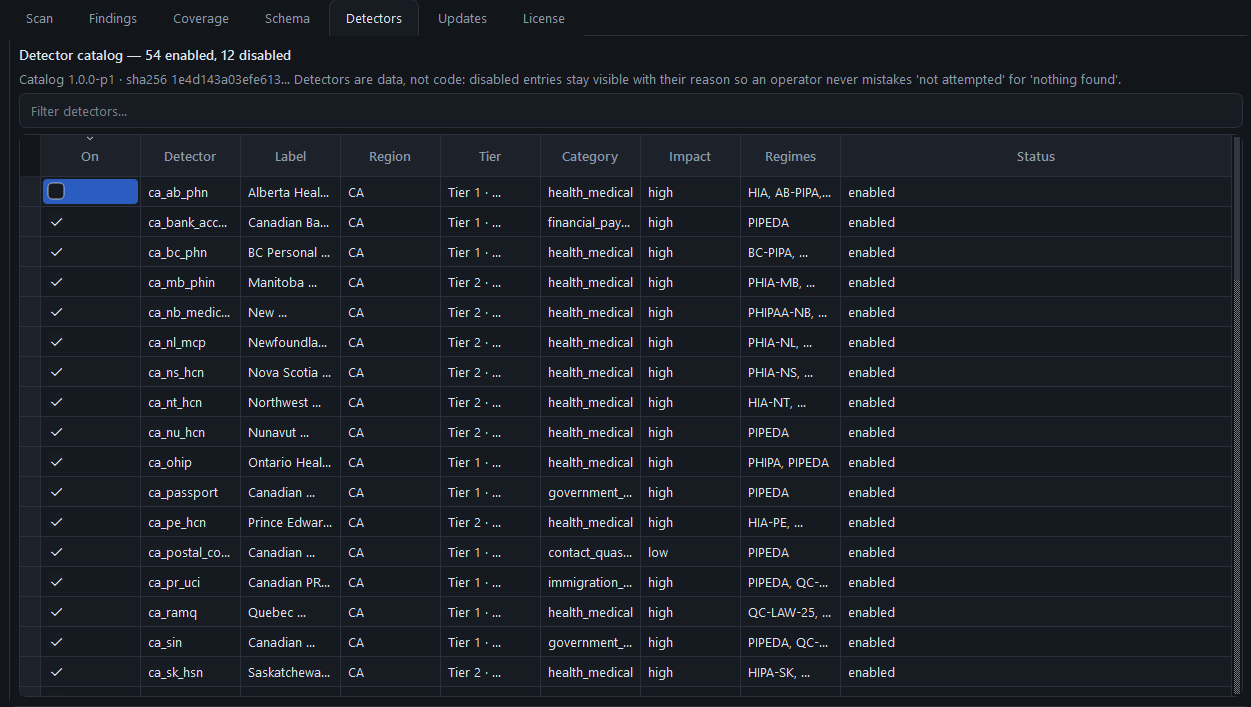
The VellumSoft detector catalog in 2.0.2 has 54 detectors enabled and 12 disabled, and disabled detectors stay visible with their reason. Health card numbers are detected alongside the SIN, as set out on the page about health card numbers by province. Planned detector pages cover US Social Security numbers (Social Security numbers), Ontario OHIP numbers (Ontario OHIP) and Quebec RAMQ numbers (Quebec RAMQ), under the detector index (detector list).
Finding Social Insurance Numbers in email
SINs rarely sit only in the payroll system. They turn up in emails from new hires who sent a photo of their SIN letter, in scanned direct deposit and tax forms, in exports from old HR software, and in mailbox archives kept after an employee leaves. These copies sit outside the payroll system's access controls, so they are easy to forget.
VellumSoft reads Outlook PST, OST and MSG files with their attachments, scans each attachment as its own file type, and labels each email finding with its folder and sender, its date and subject, and the attachment name. Version 2.0.2 does not read Word (DOCX), Excel (XLSX), ZIP or 7z files, so a SIN inside one of those, even as an email attachment, is not found. A photo of a SIN letter depends on OCR, which is less reliable on low-resolution or skewed images.
Scanning an old mailbox export before it moves is covered in the page on PST files before a Microsoft 365 import.
Who is required to collect a SIN
The Office of the Privacy Commissioner of Canada (OPC) lists the legal reasons. Employers are authorized to collect SINs from employees for records of employment and T-4 slips for income tax and Canada Pension Plan purposes1. Banks, credit unions, brokers and trust companies must ask for customers' SINs under the Income Tax Act for tax reporting, for example on interest-earning accounts and RRSPs1.
Outside those purposes, the OPC is direct: "No private-sector organization is legally authorized to request customers' SINs for purposes other than income reporting"1. Even a bank has no legal requirement to collect a SIN for an account that does not earn interest, such as a credit account1. Provincial law can add cases; the OPC notes that Hydro Québec is required by provincial law to collect a SIN for opening new accounts2. Service Canada, the federal department that administers the SIN, publishes a list of its most common uses2.
Asking for a SIN as identification
Asking is not illegal. The OPC says "there is no law prohibiting an organization from asking for a customer's SIN" for purposes other than income reporting, and that a customer may choose to supply it, as long as PIPEDA's principles are followed1.
The conditions are strict. Identification alone is not a legitimate basis for requiring a SIN, so a business asking for it as ID "must not in any way suggest" that it is required to get a product or service1. PIPEDA's clause 4.3.3 says an organization "shall not, as a condition of the supply of a product or service, require an individual to consent" to collection beyond what the stated purpose needs1. A lender running a credit check may ask for a SIN as one identification option among several, but should not make it a condition of credit1.
The OPC's advice to individuals reads the same way from the other side: "You can't be denied a product or service for refusing to provide your SIN when it's not legally required"2. It also says "Your SIN is not a piece of identification"2.
What PIPEDA requires when a SIN is collected
A SIN is the personal information of the person it is assigned to, so wherever PIPEDA applies, all its relevant provisions cover the SIN1. The map of Canadian privacy laws shows where a provincial act applies instead. The OPC's best practices turn two principles into specific steps1:
- Say why. An organization must tell the person why it wants the SIN, and the OPC says it should do so at the time of collection, stating whether it is for income reporting (and that the law requires it) or for identification (and that giving it is optional).
- Ask again for a new use. A SIN collected only for income reporting cannot later be used to identify someone without first specifying that purpose and getting express consent.
- Allow withdrawal. Where a SIN is used for identification, there must be a convenient way to withdraw consent, and the OPC recommends a toll-free telephone number1.
Keeping and disposing of SINs
PIPEDA's retention and safeguard clauses apply to SINs like any other personal information. Personal information that is no longer required for its purposes "should be destroyed, erased, or made anonymous", and an organization may be subject to legal retention periods that come first3. Clause 4.7.5 adds that care must be used in disposal "to prevent unauthorized parties from gaining access to the information"3.
The OPC's tips for individuals show the risk: store documents containing a SIN in a safe place, and shred them rather than recycle them2. A business holding years of onboarding packets, payroll exports and scanned forms has the same problem at a larger scale.
Why a leaked SIN matters
The OPC describes the SIN as able to "open the door to your personal information" and to put people "at risk of fraud and identity theft"2. Combined with other personal information, someone may use a SIN to rent vehicles, equipment or accommodation in another person's name2.
For a business, that is what makes SINs part of the sensitivity assessment after a breach. The guide to PIPEDA breach reporting explains the real risk of significant harm test, where the sensitivity of the information is one of the named factors.
A short checklist for a business
- List every form and process that asks for a SIN, and the reason for each. In most cases only income reporting makes it mandatory1.
- Where a SIN is requested as identification, label it optional on the form and offer other identification1.
- Do not use a SIN as a customer or employee number; using it for a purpose not identified at collection needs express consent1.
- Find the copies kept outside the systems that need them, and destroy those no longer required, subject to any legal retention period3.
- Treat a SIN in an exposed file as sensitive when assessing a breach2.
Limits of any SIN scan
A scan is not a guarantee that every instance in a data set will be found. A SIN typed with unusual separators, split across two lines or written by hand on a scanned form can be missed, and a nine-digit number that passes the checksum by chance can be flagged.
A SIN that was collected only because a form asked for it, and kept only because nobody deleted it, is the easiest one to remove.
This page explains the law in general terms and is not legal advice.
Questions
Can an employer ask for an employee's SIN?
Yes. The federal privacy regulator says employers are authorized to collect SINs from employees to provide records of employment and T-4 slips for income tax and Canada Pension Plan purposes.
Can a landlord or a store ask for my SIN?
No law stops them asking, but there is no obligation to give it when it is not legally required. The regulator says a person cannot be denied a product or service for refusing to provide a SIN that is not legally required, unless the business can show that no other identifier would do, and recommends offering other identification instead.
Can a bank use a SIN collected for tax reporting to identify me?
Only with consent to that extra purpose. The OPC's best practices say an organization that collected a SIN for income reporting should clearly specify any identification purpose and say that use is optional. If it did not say so at collection, it must ask for express consent before using the SIN to identify you.
How does software tell a SIN from any other nine-digit number?
Mostly by the check digit and the words around it. Microsoft's data loss prevention definition describes a SIN as nine digits with optional hyphens or spaces, requires a passing checksum, and looks within 300 characters for a SIN keyword or a supporting word such as 'date of birth'.
Sources
- Microsoft Learn, Canada social insurance number entity definitionReviewed 28 Oct 2026