A data inventory is a record of what personal information an organization holds, where it is kept, why it is held and who answers for it. Canada's privacy commissioners put the need plainly: an organization "needs to know what personal information it holds, how it is being used", and whether it needs it at all1. A file scan supplies the part nobody can write from memory, the contents of shared folders and old mailbox exports.
What is a data inventory
There are two layers, and most inventories only have the first.
The first is a list of systems. NIST's control for it is an inventory of all systems, applications and projects that process personally identifiable information5. The practice management system, the payroll service and the email platform go on this list, each with an owner and a purpose.
The second layer is location. NIST has a separate control for it: identify and document the location of the information and the specific system components on which it is processed and stored, and the users who have access5. This layer answers a narrower question. The payroll service is on the first list. The payroll export that someone saved to the Finance share three years ago is only on the second.
Who asks for a personal information inventory
| Source | What it asks for |
|---|---|
| Joint guidance from Canada's privacy commissioners (federal, Alberta, BC) | Determine what personal information the organization holds and where, including with third parties, why it collects, uses or discloses it, and how sensitive it is, and document the assessment1 |
| PIPEDA, Schedule 1 | Make available "a description of the type of personal information held by the organization, including a general account of its use", and tell an individual on request whether the organization holds information about them2 |
| NIST Cybersecurity Framework 2.0 | "Inventories of data and corresponding metadata for designated data types are maintained"3 |
| NIST Privacy Framework | Inventory the systems that process data, their owners, the categories of individuals, the purposes and the data elements, then map the processing4 |
| NIST SP 800-53 | An inventory of systems that process PII, the location of information, and optionally "automated tools to identify" information by type5 |
| CIS Critical Security Control 3 | "Develop processes and technical controls to identify, classify, securely handle, retain, and dispose of data"6 |
| FTC Safeguards Rule | "Identify and manage the data, personnel, devices, systems, and facilities" the business relies on7 |
The commissioners' guidance is written for private-sector organizations of every size, down to the owner or operator of a very small one1. It says understanding and documenting the types of personal information collected and where it is held are "critically important", because the answers decide what consent is needed, how the information is protected and how access requests get answered1. It also says the inventory is never finished: the privacy officer should "monitor and update personal information inventory continuously"1.
Why an inventory written from memory comes out wrong
People list the systems they log in to. They do not list the copies.
A clinic's inventory will name the electronic medical record. It will miss the folder of intake forms scanned to PDF before the record system arrived. An accounting firm's will name the tax software and miss the mailbox export of a partner who retired, with a decade of client attachments in it. A property manager's will name the tenant database and miss the CSV of rent payments that was emailed to the bookkeeper every month.
None of those copies is hidden. Nobody was asked to look.
How to build the inventory from a scan
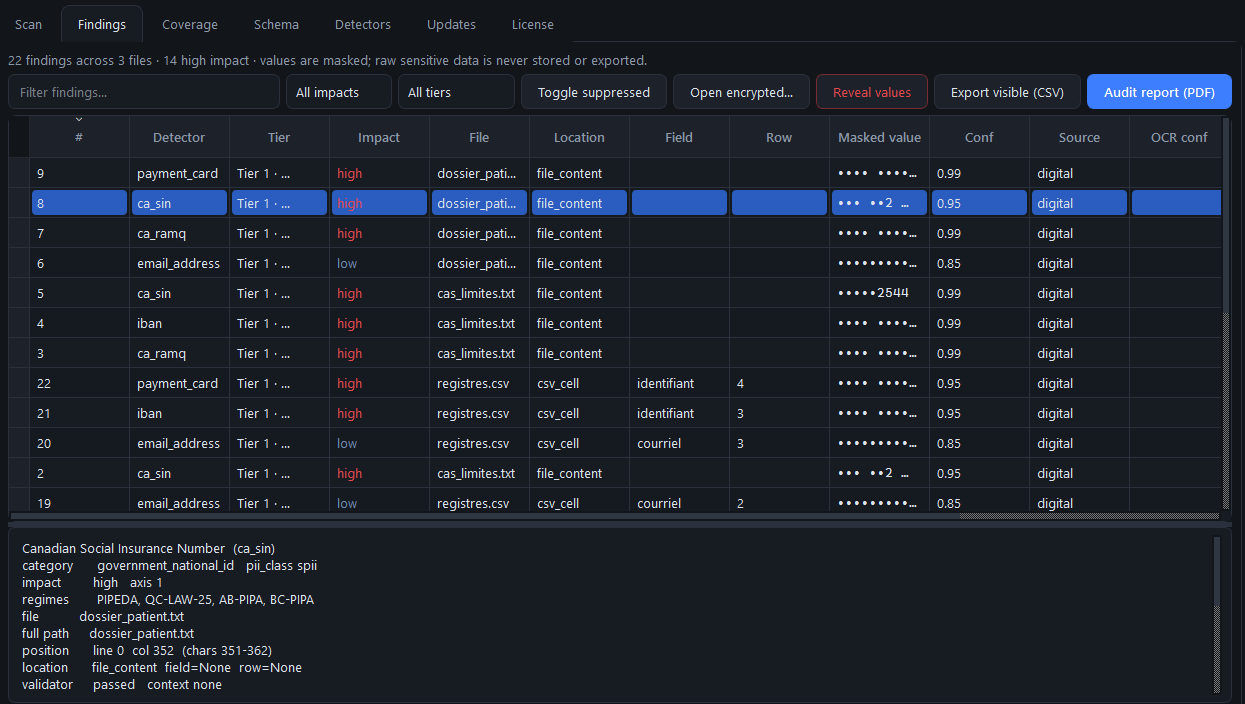
This is one of VellumSoft's typical uses: scanning shared drives and mailbox exports to find identifiers sitting outside the system of record. The work goes in this order.
- List the locations in scope: file shares, departmental folders, mailbox exports, old workstations, and who approved the scan.
- Scan them. Raise the default cap of 100 findings per file, detector and field when the goal is a complete row-by-row inventory for remediation.
- Read what the scan could not open before reading what it found.
- Sort the findings by file. A handful of files often hold most of the findings.
- Export the findings as a masked CSV and paste them into the PII inventory template.
- Add one inventory row per location, then fill in what a scan cannot know: owner, purpose, legal basis and retention rule.
- Decide what happens to each location: keep, move into the system of record, restrict access or delete.
- Scan again after the clean-up and keep both reports.
VellumSoft scans PST and email exports, documents and images for US and Canadian PII and PHI, and it runs locally so the data never leaves the machine. Each finding shows the detector that matched, the file and position, an impact level and a masked value, and for CSV files the column and the row. For CSV and JSON files, the Schema tab shows each column and the share of its values that matched a detector, which points to whole columns of sensitive data and often to the system that exported them. The how it works page and the file shares and NAS page cover the steps.
What the scan fills in, and what people fill in
| Inventory column | Where it comes from |
|---|---|
| Location and file path | The scan |
| Types of personal information found | The scan |
| How much, and how sensitive | The scan's counts and impact levels |
| What was not reviewed | The scan's coverage record |
| Whose information it is | A person, by looking at the files |
| Owner | A person |
| Purpose and legal basis | A person |
| Retention rule and decision | A person |
The right-hand column is why an inventory is more than a scan report. The commissioners ask organizations to document why they hold the information, and no scanner can read intent from a file1.
What a scan leaves out
Coverage has edges, and the inventory should show them. Version 2.0.2 does not read Word (DOCX), Excel (XLSX), ZIP or 7z files, and the Coverage tab lists what a scan did not read. VellumSoft reads local files and .pst, .ost and .msg mail archives. It does not connect to databases, a live Microsoft 365 mailbox or Gmail, so those systems go on the inventory by hand.
A scan looks for identifiers. PIPEDA defines personal information as "information about an identifiable individual", which is wider than any list of identifiers2. A performance review holds no number a detector would match, and it is still about an identifiable person. A scan is not a guarantee that every instance in a data set will be found, and VellumSoft does not delete or redact anything. Clean-up happens in the organization's own systems.
Keeping the inventory current
A quarterly scan suits shared drives and departmental folders, with further scans before and after migrations and mailbox exports. Each run updates the counts. A location whose count keeps growing has a process behind it that is producing copies, and the fix is in that process.
The same inventory serves other work: finding ePHI for a HIPAA risk analysis, working out what a breach exposed, checking PST files before a Microsoft 365 import and preparing a privacy impact assessment.
Start with the share everyone can write to. It is usually the row with the most findings and no owner.
This page explains the law in general terms and is not legal advice.
Questions
What is a data inventory?
A record of what personal information an organization holds, where it is kept, why it is held and who is responsible for it. Canada's privacy commissioners say every organization needs to determine what personal information it holds and where, why it collects and uses it, and how sensitive it is, and to document that assessment.
Does PIPEDA require a data inventory?
The Act does not use the word. It does require an organization to be able to describe the type of personal information it holds and give a general account of its use, and to tell a person on request whether it holds information about them. The commissioners' guidance treats a personal information inventory as the starting point of a privacy management program.
What is the difference between a data inventory and a data map?
An inventory is the list. A map shows movement. NIST's Privacy Framework separates the two: systems, owners, categories of individuals, purposes and data elements are inventoried, and data processing is then mapped to show the data actions and the parties involved.
What tools can build a data inventory?
NIST SP 800-53 has a control enhancement for automated tools that identify information by type on system components. File scanners do this for shares, folders and mail archives. Systems that a scanner cannot read, such as databases and cloud applications, are listed by hand or with the vendor's own export.
Sources
- NIST, The NIST Cybersecurity Framework (CSF) 2.0 (CSWP 29)Reviewed 16 Nov 2026
- Center for Internet Security, CIS Critical Security Control 3: Data ProtectionReviewed 16 Nov 2026
- eCFR, 16 CFR Part 314, Standards for Safeguarding Customer InformationReviewed 16 Nov 2026