Data retention policy software applies a retention schedule inside the systems it manages. It cannot apply one to files it does not know about. A retention cleanup deals with those: the old mailbox exports, scans and downloads that still hold personal data after the purpose for keeping it has ended. PIPEDA says such information "should be destroyed, erased, or made anonymous"1. A file scan shows where it is. People then decide what goes.
When a retention cleanup comes up
Four moments usually start one.
A retention policy is being written or renewed, and someone asks whether the schedule matches what is on the shared drive. A file server, a NAS or a batch of old laptops is about to be retired. A client or an auditor sends a questionnaire that asks how long personal data is kept and how the organization knows. Or a breach at a similar business prompts the owner to ask how much old data would be exposed if the same thing happened here.
The common thread is a gap between the schedule on paper and the files on disk. Records managers call the surplus ROT, short for redundant, obsolete or trivial. Files that are kept but never opened are often called dark data. Both are working labels with no legal meaning, and neither says whether a file contains personal information. That is the part a cleanup has to establish.
What the rules ask for
No rule here says "run a cleanup". Each one says personal data must not be kept past its purpose, which comes to the same thing for data that already has been.
| Rule | What it says |
|---|---|
| PIPEDA, Schedule 1, clause 4.5.3 | Personal information no longer required for the identified purposes "should be destroyed, erased, or made anonymous"1 |
| Quebec private-sector Act, section 23 | Once the purposes are achieved, the enterprise must destroy the information or anonymize it, subject to any preservation period provided for by an Act3 |
| FTC Safeguards Rule, section 314.4 | Secure disposal of customer information no later than two years after its last use in serving the customer, with stated exceptions, and a periodic review of the data retention policy4 |
| FTC guide for business | "Keep sensitive data in your system only as long as you have a business reason to have it"5 |
| NIST guide on PII | Regularly review holdings of previously collected PII, and destroy what is no longer relevant and necessary6 |
The Privacy Commissioner of Canada's guidance turns this into questions an organization should be able to answer. Is there "an inventory of what personal information is being retained, for which purpose and for how long"2? Does the information exist in multiple copies, and where are the copies and back-ups stored2? The Commissioner also names the stakes: where keeping personal information any longer would "increase the risk and exposure of potential data breaches", the organization should consider safely disposing of it2.
The background to these duties is on the page about data minimization and retention.
What data retention policy software does, and what it leaves
Retention software enforces a schedule inside a system. Microsoft 365 is a typical case. Microsoft says its retention settings can retain content, delete it, or retain and then delete it, and that one aim is to reduce risk "by permanently deleting old content that you're no longer required to keep"7. The policies are applied to listed locations, including Exchange mailboxes, SharePoint sites, OneDrive accounts and Teams messages7.
That design has an edge. A mailbox exported to a PST file and copied to a file share has left the list. So has an attachment saved to a desktop, and a scan sent from the copier to a folder. The schedule keeps running where the data used to be. The copy is governed by nothing.
Records retention software and document retention software for paper and scanned files have the same boundary. They manage what was filed in them. A cleanup is about what was not.
How a scan answers "what are we still holding?"
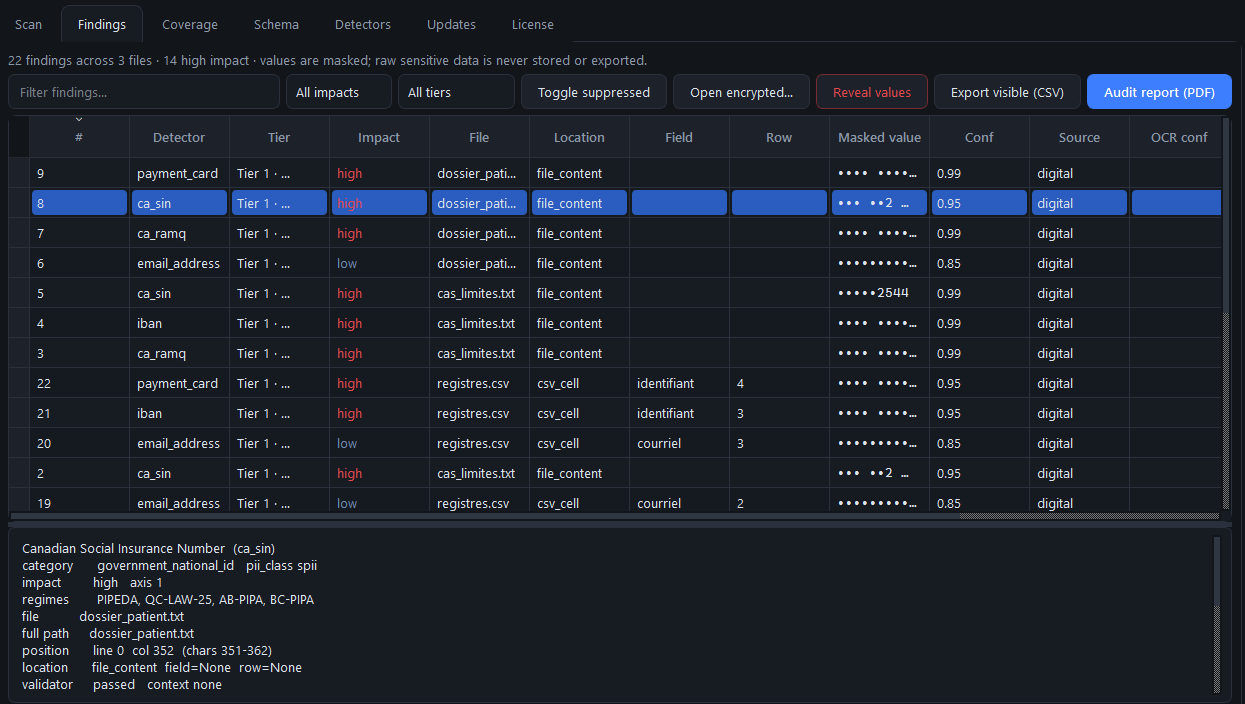
The method is short, and most of the work is in steps four and five.
- Set the scope. List the shares, archive drives and mailbox exports to check, and who approved it. A backup has to be restored to a folder first, because VellumSoft reads files and mail archives, not backup images.
- Run the scan on those locations.
- Read what the scan could not open before reading what it found.
- Add age. The columns listed for the CSV export do not include a file date, so plan to take the last-modified date of each file from the file system. Age is what a retention rule turns on.
- Compare each location with the retention schedule and sort it into one of four outcomes, shown in the table below.
- Hand each owner their list. A masked CSV export, filtered to the owner's folders, is the thing to give a remediation owner.
- Scan the same scope again afterwards, and keep both reports.
VellumSoft scans PST and email exports, documents and images for US and Canadian PII and PHI, and it runs locally so the data never leaves the machine. Each finding shows the file, the data type and the privacy laws that commonly apply.
Reduce the sensitive data footprint: four outcomes
Every location with findings ends up in one of four places.
| Outcome | When it applies | Who acts |
|---|---|---|
| Delete | The purpose has ended and no law or hold requires keeping it | The records owner, using a disposal method that fits the sensitivity |
| Move | The record is still needed but is in the wrong place | The owner moves it into the system of record, then deletes the copy |
| Hold | A statute sets a minimum period, or litigation is expected | Legal or compliance records the reason and a review date |
| Restrict | It must stay where it is for now | IT limits access to the people who use it |
Hold is the outcome that stops a cleanup from doing harm. NIST says the destruction of PII must respect litigation holds6. PIPEDA requires information used to make a decision about a person to be kept long enough for the person to access it1. A scan cannot see either of those facts. It finds the identifiers. Someone who knows the records decides.
Old backups and archived mail
Backups are where old personal data lasts longest, and the Privacy Commissioner of Canada is explicit that disposal reaches them: an organization "should also destroy all associated copies and backup files"2.
In practice a backup set is rarely edited. The workable approach is to find out which sets hold personal data, by restoring a sample to a folder and scanning it, and then to give each set a documented expiry date. The FTC Safeguards Rule recognizes the difficulty. Its disposal duty has an exception where targeted disposal "is not reasonably feasible due to the manner in which the information is maintained"4.
Archived mail is the other long-lived store. A PST export from a departed employee can hold years of attachments. The page on scanning old PST files before a Microsoft 365 import covers that case.
The report a cleanup produces
A cleanup needs evidence at both ends: what was there, and what is there now.
VellumSoft produces a PDF report with counts, file paths, data types and regulation mapping, plus a CSV of findings for remediation tracking. The report includes the scan scope and a timestamp, a coverage disclosure of what the scan could not read, and no raw values. The recommended workflow includes a second scan of the same scope to show the reduction, followed by the report. Two dated reports, before and after, are the record that a retention review took place.
What a scan does not do
VellumSoft does not block, quarantine, delete or redact, and remediation happens in the organization's own systems. Nothing is removed by scanning.
A scan does not know purposes, owners or retention periods, so it cannot say that a file is overdue. It also has format limits. Version 2.0.2 does not read Word (DOCX), Excel (XLSX), ZIP or 7z files, and those are common in exactly the folders a cleanup targets. Unread formats are counted on the Coverage tab, and zero findings beside a count of unsupported files is not a clean result. A scan is not a guarantee that every instance in a data set will be found.
The same scan serves other jobs: building a personal data inventory, finding ePHI for a HIPAA risk analysis and working out what a breach exposed. The how it works page shows the steps, and the data retention policy template gives the schedule to compare against.
The file that was deleted last quarter is the one that cannot turn up in next year's breach notice.
This page explains the law in general terms and is not legal advice.
Questions
What is a data retention review?
It is a periodic check of what an organization still holds against how long it meant to keep it. The Privacy Commissioner of Canada's checklist asks whether information holdings are reviewed periodically to see if the purpose of collection has been fulfilled, and how often.
What is ROT data?
ROT is a records-management label for files that are redundant, obsolete or trivial: duplicates, files past their retention date, and files that never needed keeping. The label says nothing about content. A ROT file that holds identity numbers is a liability, and one that holds a lunch menu is clutter.
Will a scanner delete old files for me?
No. VellumSoft does not block, quarantine, delete or redact. It reports which files hold personal data and where. The decision to delete, and the deletion, stay with the people responsible for the records.
How do you purge PII from old backups?
Start by finding out which backups hold it, which means restoring them to a folder that can be scanned. The Privacy Commissioner of Canada says disposal should include associated copies and backup files. Where selective deletion inside a backup is not practical, the usual route is to let that backup set expire on a documented date.
Is data retention policy software enough by itself?
It covers the systems it is connected to. Microsoft's retention policies, for example, apply to listed locations such as Exchange mailboxes, SharePoint sites and OneDrive accounts. Files that left those systems as exports or downloads are outside the policy and have to be found another way.
Sources
- eCFR, 16 CFR Part 314, Standards for Safeguarding Customer InformationReviewed 16 Nov 2026
- Microsoft Learn, Learn about retention policies and retention labelsReviewed 16 Nov 2026