VellumSoft reads files on the Windows computer it is installed on and never transmits scanned data or findings. The only network activity is a one-time licence activation over HTTPS. Results are encrypted with a passphrase, values are masked by default, and after activation the program works with no connection at all. A computer that can never connect still has to be activated, so agree the method with support first.
What stays on the computer
Files are read and analyzed on the computer, and scanned content, findings and reports are not uploaded. The one thing the program sends is the licence activation described below. If a network call were attempted, the scan fails closed.
You can check this rather than take it on trust. Verify with Wireshark that a scan makes no outbound connections.
The one network call
Activation is a single outbound HTTPS connection on port 443 to api.lemonsqueezy.com, the licensing service. It sends the licence key and a machine identifier derived from the hardware, and never file names, file contents, findings or reports. See offline activation for proxies and blocked hosts.
Air-gapped computers
For a workstation that can never connect, contact support before planning the deployment so the activation method is agreed in advance.
Updates come as digitally signed .dlpupd packages by download, email or USB, and nothing on the Updates tab contacts the network.
How results are protected
A results file holds no raw values, but it is a map of where sensitive data lives. These protections apply to it:
| Protection | How it works |
|---|---|
| Encryption | AES-256-GCM, with a key derived from your passphrase by scrypt |
| Tampering | A wrong passphrase, or a modified file, is rejected rather than opened |
| Passphrase rules | Shorter than eight characters is rejected; sixteen or more is recommended |
| Recovery | None, by design, so a stolen results file is useless |
| Masking | Results file and audit report never hold raw values |
| Duplicates | A salted value hash, per scan and never exported, matches repeats without revealing them |
Keep the results folder off any drive that syncs to OneDrive or another cloud service. A synced results file leaves the machine, whatever the scanner does.
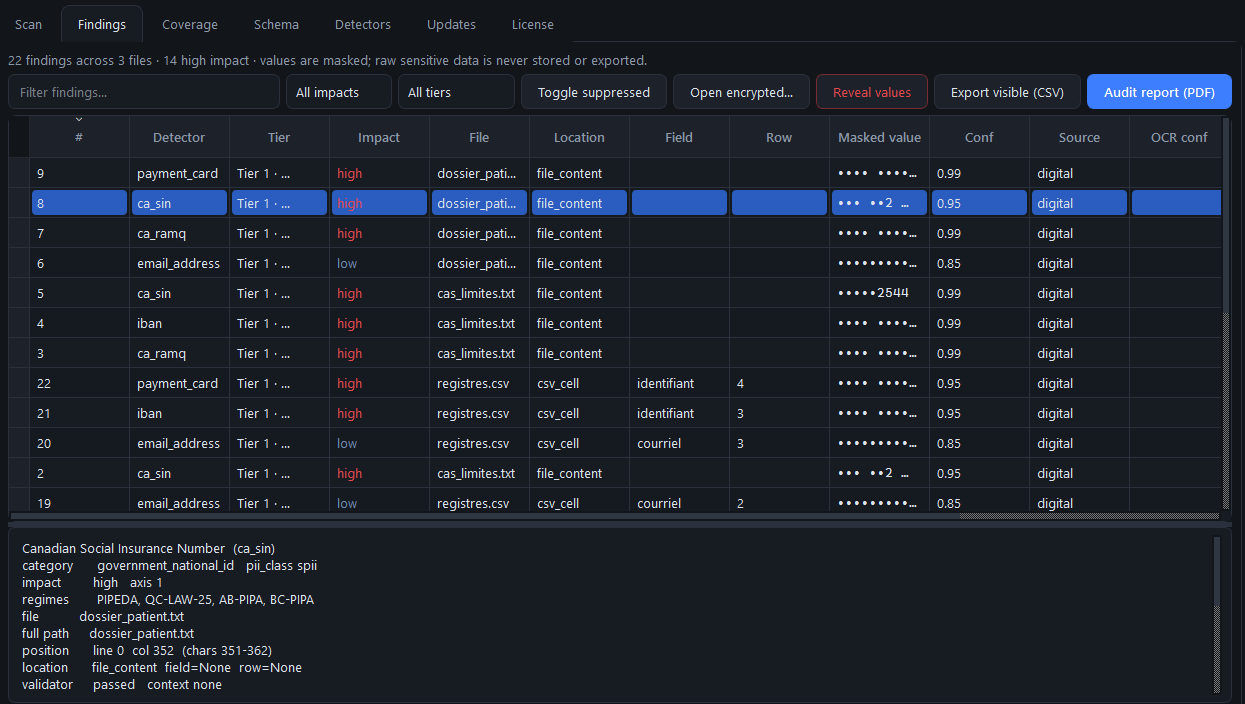
Raw values, only when needed
Verification mode shows raw values on screen, on licences that include it, after a confirmation whose default answer is No. Revealed values are held in memory for display and are never written to the results file or the audit report.
Why local scanning fits the safeguards duty
PIPEDA says personal information "shall be protected by security safeguards appropriate to the sensitivity of the information"1. It names technological measures such as passwords and encryption among the methods of protection1. It also keeps an organization responsible for information "transferred to a third party for processing"1. A scan that never leaves the computer avoids that transfer. The results still need the same care as the records.
What it does not protect against
The scanner does not block, quarantine, delete or redact. It finds where personal information sits; locking it down happens in your own systems. Check the installer too. Confirm the digital signature names Titan Grand Ventures LLC before running setup.
Related pages
Questions
Can I check that a scan makes no network connections?
Yes. Verify with Wireshark, or any other network monitor, that a scan makes no outbound connections. A green OFFLINE indicator in the header means scanning, review and reporting make no network connections.
What happens if the results passphrase is lost?
There is no recovery, by design: nobody, including VellumSoft support, can reopen encrypted results without the passphrase. The scan has to be run again.
Is a self-hosted scanner safer than a SaaS one?
It removes one party. With a cloud scanner, the records go to a vendor, and PIPEDA keeps the organization responsible for information transferred to a third party for processing. A local scanner keeps the records on the computer, but the results file still needs protecting like the data it points to.