Outlook DLP tools watch mail as it moves through a live mailbox. Old mail exported to PST, OST or MSG files and left on a drive is a file at rest, and finding personal information in it takes a file scan. VellumSoft reads .pst, .ost and .msg files, attachments included. The scan target is a file or folder, so a Gmail, IMAP or Microsoft 365 mailbox has to be exported first.
What PST, OST and MSG files are
A PST (Personal Storage Table) is a file type Microsoft created for its Outlook email client6. People export mailboxes to PST files when a mailbox fills up, when someone leaves, or before a migration, and the file then lives wherever it was saved. An OST is Outlook's offline copy of a mailbox on one computer, and an MSG file is a single saved message.
All three end up on shared drives, old laptops and backup disks. A decade-old PST from a departed bookkeeper can hold years of client correspondence with tax slips attached. One from a clinic's front desk can hold referral letters and scanned intake forms.
Why Outlook DLP does not reach mail archives
Email data loss prevention (DLP) products work on mail in a mailbox or in transit. Strac describes its Outlook product as a Microsoft 365 app that detects PII, PHI and card data in message bodies and attachments and redacts or masks it1. Nightfall describes inline monitoring of outbound email for Gmail and Microsoft Exchange Online, with blocking, quarantine and encryption2.
Neither page discusses PST files12. That matches what these products are for. Once a mailbox has been exported to a PST and copied to a file share, the messages are no longer in any mail flow, and only a tool that opens the file can see them.
What privacy law expects of old mail
Regulators do not exempt email because it is old. The FTC's guide for business starts with "Take stock", which means knowing what personal information sits in the organization's files and on its computers3. It also tells businesses to caution employees against sending Social Security numbers, passwords and account information by email, because unencrypted email "is not a secure way to transmit information"3.
In Canada, PIPEDA's safeguards principle says organizations "shall protect personal information regardless of the format in which it is held"4. Its retention principle says personal information no longer required "should be destroyed, erased, or made anonymous"4. Under HIPAA, protected health information covers individually identifiable health information maintained in electronic media or "in any other form or medium"5. A PST on a shared drive is held in a format, and it is maintained in electronic media.
What VellumSoft 2.0.2 reads in a mail archive
VellumSoft 2.0.2 reads Outlook .pst, .ost and .msg files, scanning the messages and their attachments, and each attachment is scanned as its own file type. An email finding shows the message's folder and sender, its date and subject, plus the attachment name. PST and email exports are scanned locally, so scanned data never leaves the machine.
How far a scan goes inside a mailbox depends on what the attachments are. The table below sets out how each attachment type is handled.
| Attachment in the mailbox | How it is handled |
|---|---|
| Text layer; scanned pages by OCR when OCR is on | |
| JPG, PNG, TIFF, BMP, WEBP images | Visible text by OCR, plus EXIF metadata |
| CSV, TSV, JSON, TXT | Yes, with column and row for CSV and TSV |
| Office documents and archives (unsupported) | Listed on the Coverage tab |
Version 2.0.2 does not read Word (DOCX), Excel (XLSX) or other Office formats, or ZIP and 7z archives. A Word or Excel attachment inside a PST is therefore not read either.
For a void cheque attached to an old email, the detectors include Canadian bank account numbers. They do not include transit or institution numbers, so a scan says nothing about those.
Mailboxes have to be exported first
The scan target is a folder or a single file, such as one .pst, so VellumSoft 2.0.2 does not read Gmail, IMAP or Microsoft 365 mailboxes directly. Mail has to be exported to a .pst, or saved as .msg files, before it can be scanned. The PST import guide covers the reverse case, old PST files on their way into Microsoft 365.
Scanning a PST file, step by step
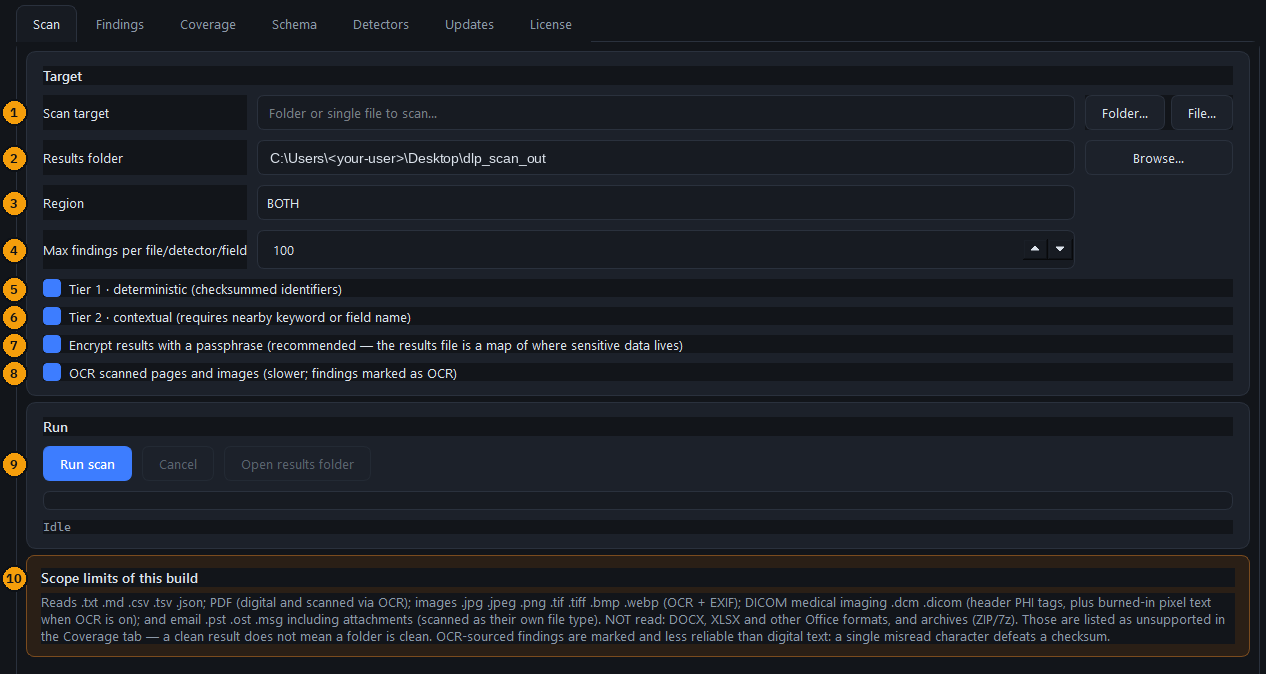
The steps for a mailbox export, in order:
- Find the archives. Search shares and workstations for .pst, .ost and .msg files and list an owner for each.
- On the Scan tab, choose File for one .pst, or Folder for a directory of them.
- Set the results folder to a new, local folder that does not sync to OneDrive or any other cloud service. A results file is a map of where sensitive data lives.
- Choose a region (US, CA or BOTH) and turn OCR on if scanned attachments are in scope.
- Run the scan, and keep the computer awake for a large mailbox.
- Open the Coverage tab before the findings, and record what was not read.
- Triage high-impact findings first, then use the folder, sender and subject in the detail panel to find each message in Outlook.
Double-clicking a finding inside a .pst, .ost or .msg file does not open it. The message has to be found in the email client.
What a mailbox scan does not do
VellumSoft does not block, quarantine, delete or redact. Cleanup happens in Outlook or in the system of record. A scan is not a guarantee that every instance in a data set will be found. No scanner finds everything.
When a PST holds mostly Word and Excel attachments, which 2.0.2 does not read, a scan with no findings proves nothing about them. The Coverage tab is where the gap shows. Either convert those files and re-scan, or record them as an accepted gap. Scanned attachments are covered on the OCR page, and the identifiers themselves under detector list, starting with Social Security numbers.
This page explains the law in general terms and is not legal advice.
Questions
Can Outlook DLP find personal information in old PST files?
Outlook DLP products are built around mail that is being sent or sits in a live mailbox. A PST file exported years ago and copied to a shared drive is just a file on that drive, so it needs a file-level scan. Searching drives for the .pst, .ost and .msg extensions is the first step.
How do I find PST files on a network drive?
Search each share and workstation for the .pst, .ost and .msg extensions, and note the owner, size and last-modified date of each file. Files from departed staff and from old migrations are the usual place to start, because nobody else is likely to know what they hold.
Does a PST scan also cover the attachments?
It depends on the tool and the attachment type. VellumSoft scans each attachment as its own file type, so a PDF or image attachment is read, while a Word or Excel attachment is not read, because 2.0.2 does not read those formats.
Can a scanner remove personal information from a PST file?
VellumSoft is a discovery tool. It does not block, quarantine, delete or redact. Remediation happens in the organization's own systems, for example by deleting messages in Outlook or moving records into the system of record.
Sources
- Strac, Outlook DLP: How to Detect & Redact Sensitive Data in Outlook EmailReviewed 16 Nov 2026
- Nightfall AI, Best Email DLP Solutions in 2026Reviewed 16 Nov 2026
- eCFR, 45 CFR 160.103, Definitions (HIPAA)Reviewed 16 Nov 2026
- GoldFynch, How to Open a PST File Without OutlookReviewed 16 Nov 2026