OCR PII detection means running optical character recognition over scanned pages and images so their text can be searched for identifiers such as Social Security or health card numbers. A scanned PDF is a picture of a page, so a text search finds nothing in it. VellumSoft reads the PDF text layer, and scanned pages by OCR when it is on. It finds identifiers and does not redact them.
Why scanned documents are a blind spot
A PDF made from a word processor carries a text layer that any search can read. A PDF made by a copier or a phone camera is usually just an image of each page. A search for "SIN" or a nine-digit number returns nothing, and the file looks clean.
These are often the most sensitive files an organization holds. PII Tools says that in a typical US healthcare setting, much sensitive data is locked in scanned intake forms, insurance paperwork, handwritten notes and archived PDFs1. Netwrix makes the same point more generally: OCR lets PII detection work in scanned images and other non-text documents that are otherwise hard to analyze2.
Paper scanned to PDF is still covered
Privacy law follows the information, not the file type. HIPAA defines protected health information as individually identifiable health information that is transmitted or maintained in electronic media, or "transmitted or maintained in any other form or medium"3. PIPEDA says organizations "shall protect personal information regardless of the format in which it is held"4.
The FTC's guide for business asks businesses to inventory "digital copiers" along with computers, laptops and flash drives to find where sensitive data is stored5. A scan-to-folder copier fills a shared drive with exactly the files a text search cannot read.
What VellumSoft 2.0.2 reads with OCR
These are the file types OCR covers in 2.0.2:
| Source | What is read |
|---|---|
| The digital text layer; scanned pages via OCR when OCR is on | |
| JPG, PNG, TIFF, BMP, WEBP images | Visible text by OCR, plus EXIF metadata |
| DICOM imaging | Header PHI tags; burned-in text in the image when OCR is on |
| PDF or image attached to an email in a PST | Scanned as its own file type |
Version 2.0.2 does not read Word (DOCX), Excel (XLSX), ZIP or 7z files, with or without OCR. A folder of scanned PDFs is in scope. A ZIP of the same PDFs is not read until it is extracted.
Where OCR goes wrong
OCR guesses at characters, and identifiers are unforgiving. A single misread character defeats a checksum, so a Social Insurance Number or card number read with one wrong digit fails its check and may not be reported at all. OCR can also cause real values to be missed, not only false ones to appear.
Where VellumSoft repairs a common confusion, such as the letter O read as zero, and the value then validates, the detail panel says so and the confidence is reduced. Handwriting, low-resolution faxes and heavily skewed pages are unreliable and are flagged low-confidence so a human reviews them.
The practical rules:
- Turn OCR on only for folders that hold scanned records or images, because OCR is the usual cause of a slow scan.
- Scan image-heavy folders separately from the rest.
- Treat every OCR finding as a lead: check the OCR confidence column and look at the page.
- Read the Coverage tab, which records low-confidence OCR as an item whose extraction was not complete.
Running an OCR scan
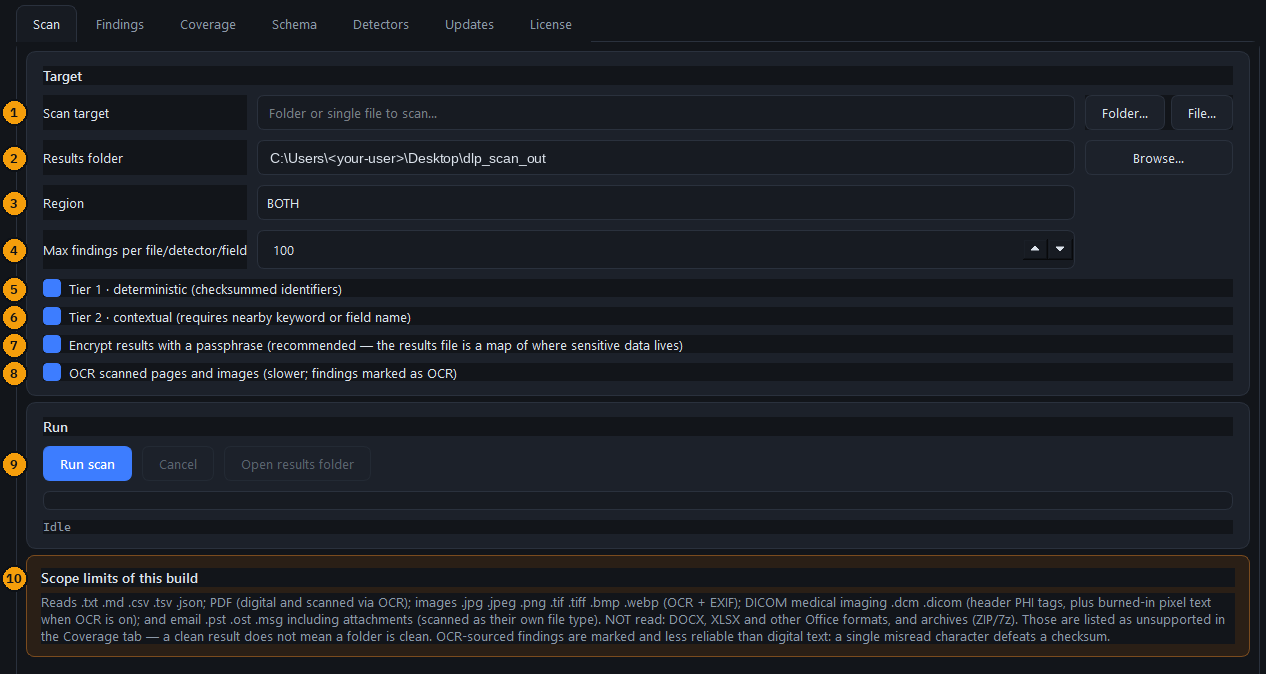
The Scan tab has an OCR option that reads text in scanned PDF pages and images, as well as DICOM pixel data, and marks OCR findings as such. Point the scan target at the folder of scans, choose a new local results folder, turn OCR on and run the scan. Findings from scanned pages show their source as OCR, with the OCR engine's confidence beside them.
Finding is not redacting
Many people searching for this want to redact a PDF. VellumSoft does not block, quarantine, delete or redact. Redaction is one of the remediation steps that happen in the organization's own systems. A scan tells you which files and which kinds of identifiers to deal with. The redaction itself needs a PDF editor that removes the underlying content, or the file can be deleted if nothing requires keeping it.
For identifiers in scanned forms, see Social Security numbers and Canadian health card numbers. Mail attachments are covered on the PST, OST and MSG page, photos under images, and the full workflow under how it works.
This page explains the law in general terms and is not legal advice.
Questions
Can a search tool find a Social Security number in a scanned PDF?
Only if it runs OCR first. A scanned page has no text for an ordinary search to match, so the tool has to read the image, turn it into text and then look for the number. If OCR misreads a single digit, the number may not match at all.
Does OCR work on handwriting?
Poorly. Handwriting, low-resolution faxes and heavily skewed pages are unreliable and are flagged low-confidence so a human reviews them. Handwritten intake forms still need a person to look at them.
How do I redact PII in a PDF once I find it?
With a PDF editor that removes the text and image content under the redaction box, or by deleting the file if there is no reason to keep it. A discovery scanner only tells you which files and pages to look at; the redaction itself happens in another tool.
Is a scanned paper record still covered by privacy law?
Yes. HIPAA's definition of protected health information covers individually identifiable health information maintained in electronic media or in any other form or medium, and PIPEDA requires organizations to protect personal information regardless of the format in which it is held.
Sources
- PII Tools, HIPAA Compliance 2026: PHI Discovery & OCR ToolsReviewed 16 Nov 2026
- Netwrix, PII Detection: How to Identify and Protect Sensitive DataReviewed 16 Nov 2026
- eCFR, 45 CFR 160.103, Definitions (HIPAA)Reviewed 16 Nov 2026