VellumSoft is a Windows 10/11 desktop program sold as a one-time purchase, with the licence key delivered at purchase. This page covers what to settle before you install: the requirements, how to check the installer, what activation does and which folder to scan first.
Is there a free trial?
VellumSoft is a paid product, sold as a one-time purchase. Setup starts from the licence key in your order confirmation email, and this page offers no trial download.
Other vendors handle this in different ways. Ground Labs, for example, has a page titled "Request a free trial"2. For tools that cost nothing, see the comparison of free PII scanners. To judge the output without installing anything, the sample report page shows what a scan produces.
What you need before installing
VellumSoft needs five things in place before setup.
- Operating system. VellumSoft 2.0.2 needs Windows 10 or Windows 11.
- Permissions. The person installing needs rights to install software, directly or through IT.
- Network. Activation needs one outbound HTTPS connection on port 443 to the licensing service, and no connection after that.
- File access. The Windows account that runs VellumSoft must be able to read the folders and files to be scanned.
- Results storage. Results belong in a local, non-synchronized, access-restricted folder, ideally on an encrypted drive.
One point on the operating system. Microsoft's lifecycle page for Windows 10 Home and Pro gives October 14, 2025 as the end of support, and says existing LTSC releases continue to receive updates beyond that date1. A computer that will read files full of personal information is better kept on a supported system, so Windows 11 is the safer choice for a new install.
No minimum processor, memory or disk figures are published.
Check the installer before you run it
Verify the installer first: right-click the file, open Properties, then Digital Signatures, and confirm the signer is Titan Grand Ventures LLC, the publisher of VellumSoft. If the signature is missing or shows anyone else, do not install it, and contact support.
Setup then shows the End User License Agreement with Titan Grand Ventures LLC, which has to be accepted to continue. Use only the official installer. If the OCR option is ever missing, the fix is to reinstall from it.
The one-time activation
On first start VellumSoft opens an activation window. The licence key is pasted in, verified once over HTTPS and locked to that computer. Activation sends the key and a machine identifier derived from the hardware. It does not send file names, file contents, findings or reports.
After that, VellumSoft works offline. The licence check at activation is the only network activity.
Two details are worth knowing before activation.
The licence is tied to the machine. Each seat activates on one computer, and moving to a replacement means emailing [email protected] with the order number. Choose the workstation with care.
A computer that can never go online is a special case. Contact support before planning such a deployment. The offline activation page has the detail.
Updates
VellumSoft updates arrive as digitally signed packages by any channel, including download, email or USB, and the Updates tab makes no network connection. The plan features include 12 months of updates.
What to scan first
Start with made-up data. Build a practice folder of files with test data before touching real records. A small CSV and a text file are enough for a first exercise.
Then pick one real store that nobody has looked at. Typical places to point VellumSoft at are shared drives and mailbox exports, including decade-old .pst files and forwarded attachments. Scan the mailbox everyone has been avoiding.
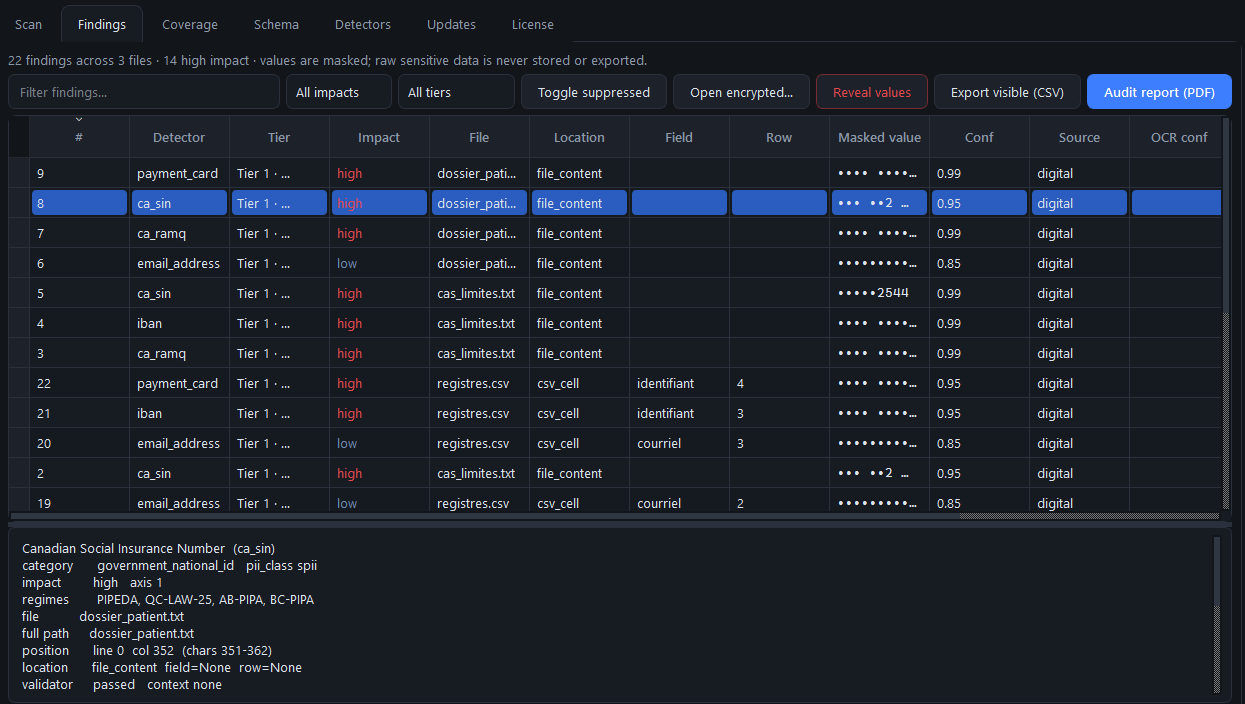
Three habits make the first real scan useful:
- Point the results folder at a local folder that does not sync to a cloud drive, and keep encryption on.
- Store the results passphrase in a password manager before starting. There is no recovery.
- Open the Coverage tab before the findings, and treat anything listed there as unreviewed.
The third habit matters because of what this version leaves out. Version 2.0.2 does not read Word (DOCX), Excel (XLSX), ZIP or 7z files. A first scan of a general office share will list many files as unread. Convert the ones in scope to PDF or CSV and scan again.
What it will not do
VellumSoft does not block, quarantine, delete or redact, and does not certify a data set as clean. A scan is not a guarantee that every instance in a data set will be found.
Before you buy
Read how a scan works for the full sequence, the security page for what stays on the computer, and the pricing page for licence terms. The home page has the overview.
Have the Windows computer chosen and a practice folder ready before the key arrives, since the key binds to the first machine it activates on.
This page is general information and is not legal advice.
Questions
Is there a free version or a free trial of VellumSoft?
VellumSoft is a paid product, sold as a one-time purchase. This page offers no free version and no trial download. People who need a free tool can start with the comparison of free PII scanners.
What do I need before installing?
A Windows 10 or Windows 11 computer, rights to install software, the licence key from your order confirmation email, internet access once for activation, and a local folder for results that is not synchronized to a cloud service.
How do I know the installer is genuine?
Open the installer's Properties, look at the Digital Signatures tab and confirm the signer is Titan Grand Ventures LLC, the publisher of VellumSoft. If the signature is missing or names anyone else, do not install it, and contact support.
Does the computer need to stay online?
No. The only network activity is a one-time licence check at activation. VellumSoft works offline from then on, and updates arrive as signed packages that can be carried in by any channel.
Sources
- Microsoft Learn, Windows 10 Home and Pro, Microsoft LifecycleReviewed 16 Nov 2026
- Ground Labs, Request a free trialReviewed 16 Nov 2026