A HIPAA risk analysis is the Security Rule's required "accurate and thorough assessment" of the risks to the electronic protected health information (ePHI) an organization holds1. NIST's method starts by working out where ePHI is created, received, kept and sent2. A file scan answers that one question with evidence. It is not the analysis itself, and it does not replace one.
What the Security Rule asks for
The duty sits in 45 CFR 164.308(a)(1), under the standard called the security management process1. The text asks each organization to "conduct an accurate and thorough assessment of the potential risks and vulnerabilities" to the confidentiality, integrity and availability of the ePHI "held by the covered entity or business associate"1. The word "Required" follows it in the regulation, so it is not one of the items the rule marks "Addressable"1.
A second required step comes straight after. Risk management means putting in place security measures "sufficient to reduce risks and vulnerabilities to a reasonable and appropriate level"1. The analysis finds the risks, and risk management deals with them.
The work has to be written down. The Security Rule's documentation standard says that when an action, activity or assessment has to be documented, the organization must keep a written record of it, which may be electronic, and retain it for 6 years from the date it was created or the date it was last in effect, whichever is later4.
Does HIPAA require an annual risk assessment?
Not in the current text. The risk analysis paragraph gives no interval, and the related evaluation standard asks only for a "periodic technical and nontechnical evaluation" and a fresh look when operations or the environment change1.
NIST's guide says organizations should not treat the assessment "as a one-time, static task but as an ongoing activity", updated on a periodic basis2. It also notes that some programs set their own schedule, and gives the Medicare Promoting Interoperability Program as one that requires an annual risk assessment2.
That may change. On January 6, 2025, HHS published a proposed rule that would require the written risk assessment to be reviewed and updated "at least once every 12 months"5. The same proposal would add a written technology asset inventory and a network map showing how ePHI moves through an organization's systems5. As of the date the sources for this page were reviewed, the eCFR text of 164.308 still shows the older wording, with no inventory standard1.
The first question: where is the ePHI?
Whatever method is used, the starting point is the same. NIST's first step says that before it begins, the organization should understand where ePHI is created and received, where it is kept and processed, and where it is sent2. The guide's activity table for 164.308(a)(1) opens with identifying all ePHI and the relevant information systems, and one of its sample questions is whether all ePHI generated, stored, processed and transmitted within the organization has been identified2.
NIST explains why the step matters. If an organization does not fully identify all the parties or systems that ePHI is sent to, "it may not be possible to completely identify all relevant threats and vulnerabilities"2. A risk rated on an incomplete list is a rating of the wrong thing. HHS has said this is where organizations fall down. In its 2025 proposal it wrote that OCR investigations frequently find organizations lack a sufficient understanding of where all the ePHI in their care is located5.
The definition makes the list longer than most people expect. ePHI is protected health information transmitted by or maintained in electronic media, and electronic media includes hard drives and "any removable/transportable digital memory medium"6. A patient list saved to a desktop is ePHI. So is a mailbox export on a USB drive.
What the HHS SRA Tool does
The Security Risk Assessment (SRA) Tool was developed by ONC with the HHS Office for Civil Rights to help providers through the process3. HealthIT.gov says its target audience is "medium and small providers" and that it may not suit larger organizations3. It is a Windows desktop application that walks the user through multiple-choice questions and through threat, vulnerability, asset and vendor sections3. Everything entered is stored on the user's own computer3.
The tool is a questionnaire. Version 3.7 added a new assessment-scope question meant to make sure an assessment accounts for "every location that creates, receives, maintains, or transmits ePHI"3. The same release notes add a reminder that "the SRA Tool survey alone may not identify all risks present in an organization"3.
So the tool asks the location question and trusts the answer. Someone at the practice types in the EHR, the billing system and the shared drive. Nobody has opened the shared drive to see what is in it.
Where ePHI sits outside the system of record
The EHR is the easy answer. The harder ones are the copies that left it.
| Place | Why ePHI ends up there | What a file scan can show |
|---|---|---|
| Old mailbox exports (PST files) | Referral letters, lab results and insurance forms sent as attachments | Which messages and attachments hold identifiers |
| Scanned intake and consent forms saved as PDF | Front-desk scanning to a shared folder | Identifiers read from the page image by OCR |
| CSV exports from billing or scheduling | Reports pulled once and never deleted | The column and row of each identifier |
| Imaging files (DICOM) | Studies copied off a modality or burned for a patient | Patient details in the file header |
| Photos of insurance cards and ID | Taken on a phone, synced to a workstation | Text visible in the image |
NIST asks that the scope of the assessment include removable media and portable devices such as laptops, along with the systems on the network2.
How a scan answers the location question
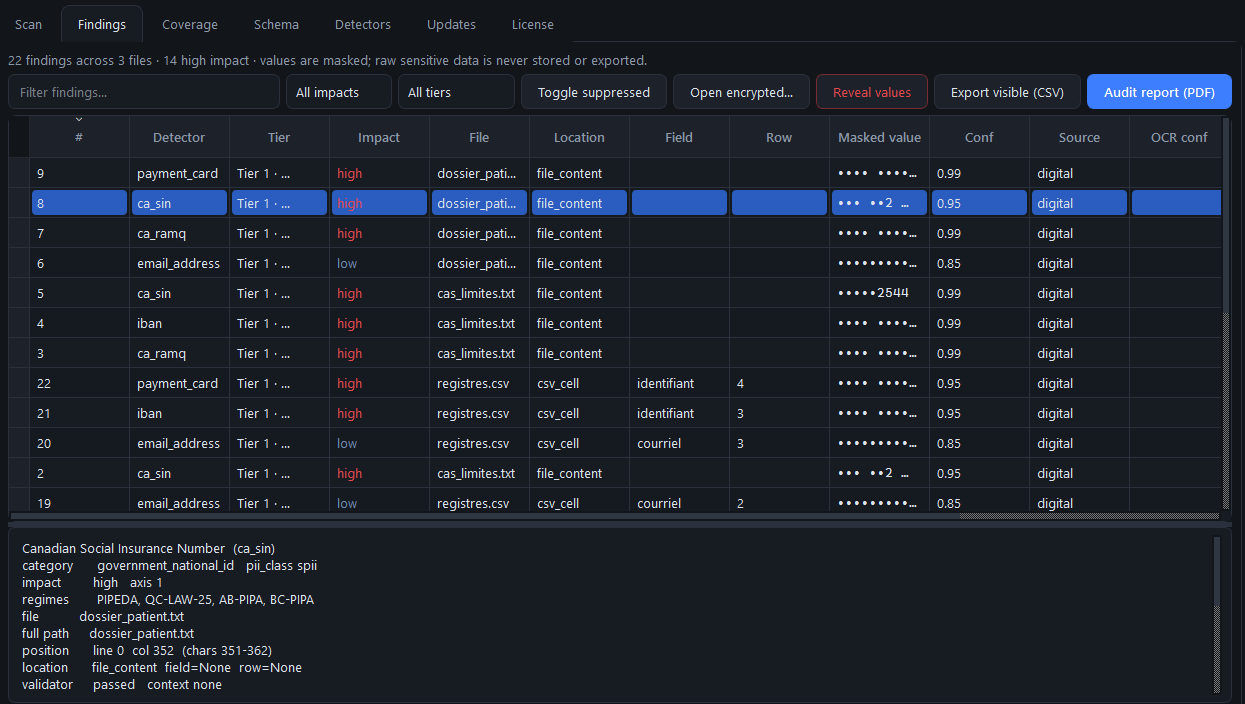
A scan turns a belief about the shared drive into a list. The work goes in this order:
- Write down the scope: which shares, folders, workstations and mailbox exports are being checked, and who approved it.
- Run the scan on those locations.
- Read what the scan could not open before reading what it found.
- Copy each location that holds ePHI into the asset list of the risk analysis, with the kind of data and a rough count.
- Keep the report with the risk analysis record, dated.
- Carry on with the rest of the analysis: threats, vulnerabilities, likelihood, impact and a risk level for each pair2.
VellumSoft scans PST and email exports, documents and images for US and Canadian PII and PHI, and it runs locally so the data never leaves the machine. Its US detectors include SSN, Medicare MBI and NPI. The Detectors tab in the app is the complete, current list for the installed version. Each finding shows the file, the position and the privacy laws that typically apply, with values masked by default.
The report holds a scan scope and timestamp, counts per data type, file-level locations and a coverage disclosure of what the scan could not read. That last part belongs in the risk analysis too, as a known gap. The how it works page covers the steps, and the HIPAA risk assessment template has an ePHI location sheet to copy findings into.
What a scan does not do
A scan does not rate anything. It names no threats, weighs no likelihood and sets no risk level, so on its own it does not meet 164.308(a)(1)1. It is also not a vulnerability scan. NIST lists vulnerability scan results and penetration tests as inputs for finding weaknesses in systems, which is a separate question from where the data is2.
Coverage has limits. Version 2.0.2 does not read Word (DOCX), Excel (XLSX), ZIP or 7z files, so a folder of those needs converting first or another review method. It reads local files and PST, OST and MSG mail archives. It does not connect to an EHR database, a live Microsoft 365 mailbox or Gmail, so those systems are documented in the analysis the usual way. VellumSoft does not block, delete or redact. No scanner finds everything.
Related uses of the same scan are covered under breach scoping, checking PST files before a Microsoft 365 import, personal data inventory and privacy impact assessment. The difference between the two terms is explained in HIPAA risk analysis vs risk assessment, and the wider rule set in the HIPAA guide for small practices.
The practical test is simple. If the risk analysis lists the shared drive as a place ePHI lives, someone should be able to say what is on it.
This page explains the law in general terms and is not legal advice.
Questions
What is a HIPAA risk analysis?
It is a required step in the HIPAA Security Rule. A covered entity or business associate must conduct an accurate and thorough assessment of the potential risks and vulnerabilities to the confidentiality, integrity and availability of the electronic protected health information it holds. The results feed the risk management step that follows it in the same section.
Does HIPAA require a risk assessment every year?
The current Security Rule text sets no interval for the risk analysis. NIST says the assessment should be updated on a periodic basis and treated as an ongoing activity. A rule proposed by HHS in January 2025 would require a review at least once every 12 months, but a proposal is not yet a duty.
Is the HHS SRA Tool enough for a HIPAA risk analysis?
HealthIT.gov says the tool is built for small and medium providers and is provided for informational purposes only. Its own notes for version 3.7 say the survey alone may not identify all risks present in an organization. The tool asks where ePHI is. It does not look inside files to check the answer.
Is a PHI scan the same thing as a HIPAA vulnerability scan?
No. A vulnerability scan tests systems for technical weaknesses, and NIST lists its results as one input when identifying vulnerabilities. A PHI scan reads files and reports where health identifiers sit. One tells you how a system could be attacked. The other tells you which folders hold the data worth protecting.
Who has to do a HIPAA risk analysis?
Covered entities and business associates. The Security Rule text names both, so a billing company or IT provider that holds ePHI for a clinic has the same duty as the clinic for the ePHI it holds.
Sources
- eCFR, 45 CFR 164.308, Administrative safeguardsReviewed 16 Nov 2026
- HealthIT.gov (ONC), Security Risk Assessment ToolReviewed 16 Nov 2026
- eCFR, 45 CFR 164.316, Policies and procedures and documentation requirementsReviewed 16 Nov 2026
- eCFR, 45 CFR 160.103, DefinitionsReviewed 16 Nov 2026