To find PII on a NAS or a shared drive, scan it as what it is: folders of files at rest, built up over years of exports, scanned forms and old mailboxes. VellumSoft scans a folder and everything in it, run from one Windows computer whose account can read that folder. This page assumes the share is mapped to a drive letter.
What piles up on a file share
A share is where copies go to be forgotten. Someone exports payroll to CSV to fix one row. The copier saves every scanned form to a folder. A departed employee's mailbox is exported to a PST and parked under "Archive". None of these copies is in the system of record, and nobody is assigned to them.
Regulators treat those copies like any other record. The FTC tells businesses to inventory computers, laptops, flash drives, digital copiers and other equipment to find out where sensitive data is stored, and adds that "No inventory is complete until you check everywhere sensitive data might be stored"4. In Canada, PIPEDA says personal information that is no longer required "should be destroyed, erased, or made anonymous"5. Neither rule can be met for files nobody knows about.
A one-time scan and endpoint DLP answer different questions
Endpoint data loss prevention (DLP) watches what people do with data from now on. Microsoft's Purview scenario for US PII monitors activity on endpoint devices and alerts administrators in real time when a policy match occurs2. Nightfall describes endpoint DLP as "Deployed as an agent to monitor data stored and created on the device"3.
A one-time scan answers the older question of what is already sitting there. PII Crawler takes the network route: its docs say it reads an SMB share over the network without mounting it, given a server name, a share name and credentials1. VellumSoft works differently. It is a desktop application pointed at a folder or a single file, reading whatever the signed-in Windows account can read.
That makes it a fit for a one-off or quarterly check by one person on one computer. It is not a monitoring agent, and it does not block anything.
What VellumSoft 2.0.2 reads on a share
The table sets out what version 2.0.2 reads from each kind of file on a share.
| On the share | What is read |
|---|---|
| Text, CSV, TSV and JSON exports | Yes; CSV and TSV findings give the column and row |
| PDFs | The text layer; scanned pages by OCR when OCR is on |
| JPG, PNG, TIFF, BMP and WEBP images | Visible text by OCR, plus EXIF metadata |
| DICOM imaging files | Header PHI tags; burned-in text when OCR is on |
| PST, OST and MSG mail files | Messages and attachments, each attachment as its own file type |
| Office documents and archives (unsupported) | Listed on the Coverage tab |
The last row matters most on a file share. Version 2.0.2 does not read Word (DOCX), Excel (XLSX) or other Office formats, or ZIP and 7z archives, and shares are where those files collect. Zero findings in a folder of unread files tells you nothing about them. If they are in scope, convert those files to PDF or CSV, or extract the archives, and scan again.
Mail archives get their own page, PST, OST and MSG files, as do scanned PDFs. Two more cover photos and image scans and CSV, TSV and JSON exports, and the whole list is under supported files and sources.
Mapped drives, UNC paths, NAS boxes and external drives
Windows reaches a network share in two ways. A UNC path names the server and the share, in the form \Server\Share, and Microsoft says UNC paths "are used to access network resources"6. A mapped drive gives the same share a drive letter.
The Scan tab takes a folder, a single file or a pasted path. This page covers mapped drive letters; UNC paths are not covered here, so map the share to a letter.
A NAS that presents a Windows share is, from the scanning computer, one more mapped drive. The same goes for an external hard drive plugged into that computer, which already has a drive letter. For workstations, each licence seat activates on one computer, so scanning a workstation's local disk means either running the scan on that workstation or reaching its folders from the scanning computer as a share.
Whatever the route, the Windows account running VellumSoft must be able to read the folders and files being scanned. A folder that account cannot open is a gap, not a clean folder.
Setting up a share scan
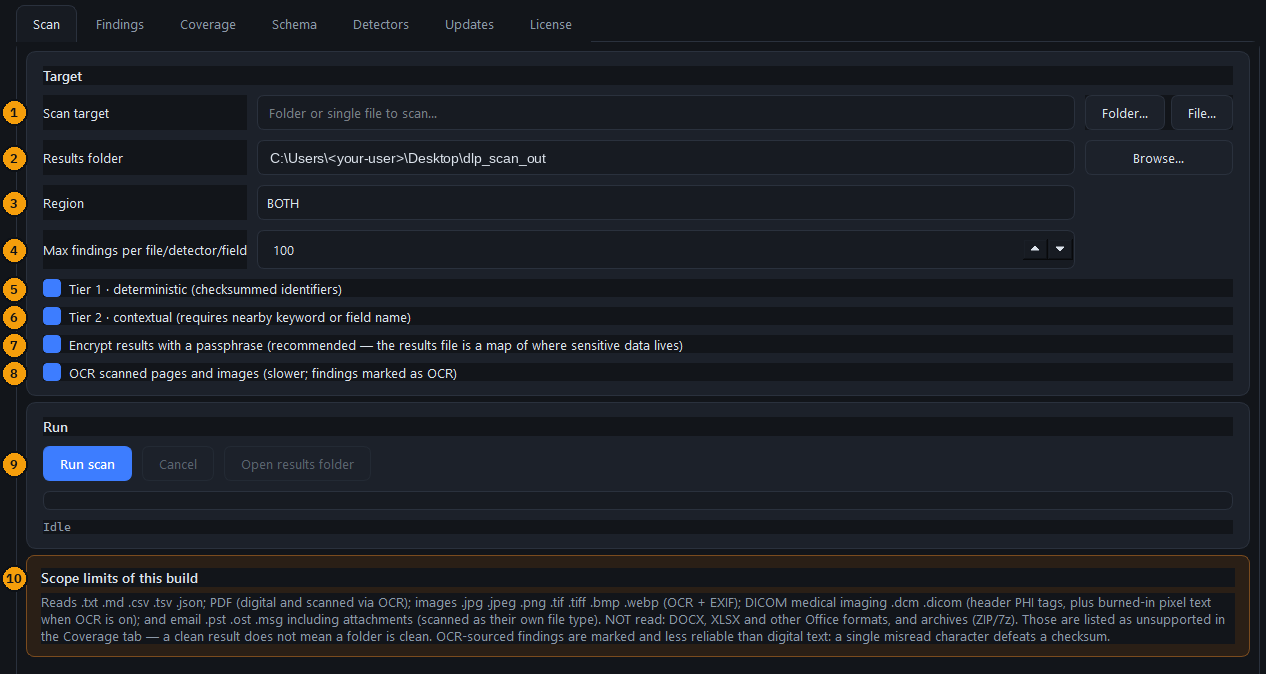
The steps below follow the Scan tab. The longer version is in scanning a mapped network share.
- Agree the scope in writing: which shares and folders, and who may review the results.
- Map the share to a drive letter with an account that has read access to everything in scope.
- On the Scan tab, choose Folder and select the mapped drive or a subfolder.
- Point the results folder at a new, empty folder on the local disk. A results file is a map of where sensitive data lives, so it does not belong on the share being scanned or on a Desktop that syncs to the cloud.
- Turn OCR on only for folders of scanned records or images. OCR is the usual cause of a slow scan.
- Run the scan, then open the Coverage tab before the findings.
A missing scan target stops the scan, and unreadable, corrupt or password-protected items are reported instead of being skipped in silence. A mapped drive that is not connected when the scan starts is a target path that does not exist. For a target that is not found, VellumSoft does not report success for data it could not read, which is the safer failure.
After the scan
Sort the findings by file. A handful of files often hold most of the findings, and on a share those are usually old exports. VellumSoft does not delete or redact, so the clean-up happens at the source: delete what is no longer needed, move records into the system of record, or restrict the folder. Hand each folder owner a masked CSV filtered to their folders, then scan the same scope again to show the reduction.
No scanner finds everything, and a scan is not a guarantee that every instance in a data set will be found. The full sequence from scope to report is on how a scan works. VellumSoft Solo is $399 per seat and Team is $749, each a one-time payment, and the pricing page has the terms.
The oldest folder on the share is usually the best place to start, because it holds the files with no owner left to ask.
This page explains the law in general terms and is not legal advice.
Questions
Does anything have to be installed on the file server or NAS?
VellumSoft is installed once, on the Windows 10 or Windows 11 computer that runs the scan. The one condition for a scan target is that the Windows account running the scan can read the folders and files in scope. The steps on this page involve no software on the server or the NAS itself.
Will the scan remove PII from the file share?
No. VellumSoft does not block, quarantine, delete or redact, and remediation happens in the organization's own systems. A scan produces a list of files and locations. Deleting an old export, moving a record into the system of record or restricting a folder is done by the people who own those files.
Does it scan Exchange or Microsoft 365 mailboxes along with the file server?
Not directly. The scan target is a folder or a single file, so a mailbox on Exchange or Microsoft 365 has to be exported to a PST file first. PST, OST and MSG files that already sit on the share are read as part of the folder scan, attachments included.
How often should shared drives and workstations be scanned?
We suggest a quarterly scan of shared drives and departmental folders, plus a scan before and after migrations, mailbox exports and decommissioning, and an immediate one when scoping a suspected incident. How often workstations are scanned is the organization's own decision, and we suggest no separate figure for them.
Sources
- PII Crawler Docs, Scan an SMB Network ShareReviewed 16 Nov 2026
- Nightfall AI, Cloud vs. Network vs. Endpoint DLPReviewed 16 Nov 2026
- Microsoft Learn, File path formats on Windows systemsReviewed 16 Nov 2026