VellumSoft 2.0.2 does not read Excel (XLSX) workbooks, so finding PII in spreadsheets starts with a CSV export. CSV, TSV and JSON files are read in a structure-aware way. Each CSV or TSV finding gives the column and the row, and the column header acts as context, so a number under a header such as "health card" has the support a contextual detector needs.
Finding PII in spreadsheets: Excel is not read, CSV is
This is the first thing to know before pointing a scan at a finance or HR folder. Version 2.0.2 does not read Word, Excel or other Office formats. A folder of workbooks that returns zero findings is not a clean folder, because version 2.0.2 does not read XLSX.
The fix is to convert those files to CSV or PDF and scan again, or to record them as an accepted gap. Two details from Microsoft's own instructions matter when converting:
- Saving as CSV keeps one worksheet. Microsoft says a dialog box appears, "reminding you that only the current worksheet will be saved to the new file"3. A workbook with a tab per year needs one export per tab.
- Leave the export alone afterwards. Microsoft notes that a column of numbers with leading zeros has to be converted to text on import "so you can preserve the leading zeros"3. An identifier that loses a leading zero is a different number, and a checksum will no longer pass.
After the scan, the Coverage tab is the check. It lists the formats the scan met and could not read, so any workbook that was missed shows up there by count.
What column-aware means
A CSV file is rows of fields separated by commas. The specification allows an optional header line, which "will contain names corresponding to the fields in the file"1. That header is the most useful thing in the file for a scanner, because it says what each column is supposed to hold.
VellumSoft has two tiers of detector. Tier 1 identifiers carry a mathematical or structural check, so a match must pass the validator. Tier 2 identifiers have no reliable checksum and are reported only when a nearby keyword or a field name supports them. In a CSV, the field name is the column header.
Each finding in a CSV or TSV file reports:
| In the findings table | What it holds |
|---|---|
| Location | csv_cell, a specific cell, as opposed to file_content for body text |
| Field | The column name |
| Row | The row the value sits in |
| Masked value | The value with most characters hidden |
Context works in English and French, so a column named "courriel" is read as context.
How this differs from a file-level search
Most guidance on this topic stops at the file. Lepide's walkthrough of Windows file classification ends with reviewing the results "to identify files containing PII, PHI, or financial data"5. PII Crawler's article makes the risk plain, saying "CSVs exported from databases are one of the most common vectors for PII exposure"2.
Knowing the file is half the job with an export. A client list with forty columns may hold one that matters, and the person fixing it needs to know which column and how many rows. Column and row are also what let a remediation owner confirm the fix against the source system without anyone opening the raw values.
JSON exports and the Schema tab
JSON has no rows and columns. Its building block is the object, which the JSON specification describes as "zero or more name/value pairs"4. For CSV, TSV and JSON files, the header row or JSON key path is the strongest signal available.
The Schema tab lists each column or key, its inferred type and the ratio of values that matched a detector. A column of email addresses stands out there, and so does a column that holds bank and card numbers. A whole column of sensitive data usually leads back to the system that exported it, and so to the root-cause fix.
That matters under privacy law as well as for tidiness. PIPEDA says personal information that is no longer required "should be destroyed, erased, or made anonymous"6. An export made for one task and left on a drive is a second copy with no purpose left.
Scanning an export, step by step
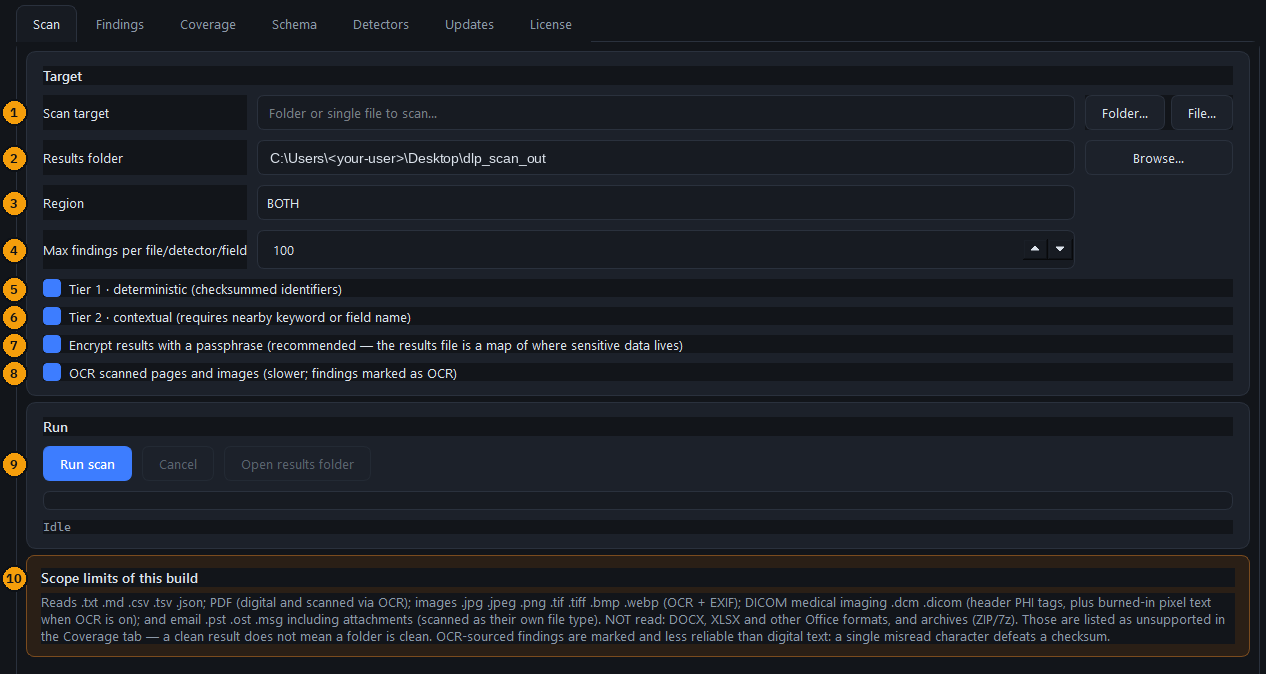
- Collect the exports in scope. Convert any workbooks first, one CSV per worksheet, since version 2.0.2 does not read XLSX.
- On the Scan tab, choose Folder for a directory of exports or File for a single one.
- Keep both tiers on. Tier 2 is what brings in identifiers confirmed by a field name.
- Decide on the findings cap. The default is 100 for the same detector in the same file and field, with totals still counted. Raise it for a complete row-by-row inventory.
- Run the scan, read Coverage, then open the Schema tab to see which columns are mostly identifiers.
- Export a masked CSV of the findings for whoever owns the source system.
What a CSV scan does not do
VellumSoft reads files and folders, not database connections, so a table has to be exported before it can be scanned. VellumSoft does not block, quarantine, delete or redact, which means the export itself is cleaned up or deleted by its owner.
A headerless CSV loses its context. Tier 1 identifiers such as card numbers still stand on their checksum, but Tier 2 needs a keyword or a field name, so a column of unlabelled health numbers may go unreported. No scanner finds everything.
Exports usually sit on shared drives, which the page on shared drives, NAS and workstations covers. Other sources are on PST, OST and MSG mail files, PDFs and scanned documents and photos and image scans, with the full list under supported files and sources. The identifiers themselves are listed under all detectors by country.
The quickest win with any export is usually the Schema tab: one column of identifiers, traced to one system, fixed once.
This page explains the law in general terms and is not legal advice.
Questions
Excel workbooks are not read: how do I scan them?
Save each worksheet as a CSV file and scan the CSV files. Version 2.0.2 does not read Excel (XLSX) or other Office formats, so those files have to be converted to PDF or CSV and scanned again. Microsoft's instructions note that saving as CSV keeps only the current worksheet, so a workbook with several worksheets needs several exports.
Does a CSV file need a header row for the scan to work?
It helps a great deal. The CSV specification treats the header line as optional. Column headers act as context for Tier 2 detectors, the identifiers that have no reliable checksum. Without a header such as health card, those numbers have nothing nearby to support them, while checksummed Tier 1 identifiers still stand on their validator.
Why does one large export show only some of its rows?
The default cap is 100 findings for the same detector in the same file and field, so one large export cannot drown out everything else. Totals are still counted. Raise the cap when a complete row-by-row inventory is needed for remediation.
Are French column names understood?
Yes. Context works in English and French, so a column named courriel is read as context. A bilingual export from a Quebec payroll or patient system keeps its column names as context either way.
Sources
- PII Crawler Blog, Scanning Unstructured Data for PIIReviewed 16 Nov 2026
- Microsoft Support, Import or export text (.txt or .csv) filesReviewed 16 Nov 2026
- IETF, RFC 8259, The JavaScript Object Notation (JSON) Data Interchange FormatReviewed 16 Nov 2026
- Lepide, How to Find Files Containing PII, PHI, or Financial DataReviewed 16 Nov 2026