Data discovery for MSPs means scanning a client's file shares, workstations and mailbox exports to find where personal and health information sits, then handing the client a report they can act on. It answers the first question in most assessments: what sensitive data do we hold, and where? An MSP that handles that data can be a business associate under HIPAA, or a service provider that the client must oversee under the FTC Safeguards Rule12.
The rules that bind an MSP and the businesses it serves
An MSP's clients usually fall under one of three regimes, and each treats the IT provider differently.
| Client | Rule | What it says about the IT provider |
|---|---|---|
| US clinic, dentist, health plan | HIPAA | A business associate creates, receives, maintains or transmits protected health information for a covered entity; a subcontractor doing the same for a business associate is one too1 |
| US tax preparer, mortgage broker, lender | FTC Safeguards Rule | A service provider is anyone permitted access to customer information through services to the institution; the institution must oversee it by contract2 |
| Canadian business | PIPEDA | The principal organization stays responsible for information sent to a processor, and the processor still has obligations for information in its custody3 |
The Safeguards Rule names tax preparation firms among the financial institutions it covers, and its customer information includes records "in paper, electronic, or other form"2. The Rule also lets the Qualified Individual who oversees a client's security program be employed by a service provider2. In that arrangement the MSP is running part of the client's compliance program, not just its servers.
The FTC's general guide for business makes the same point in plain words. It tells businesses to put security expectations in writing in contracts with service providers, and then to "verify compliance"4.
Where client PII hides
The FTC's first step for any business is to take stock, which means knowing what personal information sits in its files and on its computers4. For a typical small client, the answer is rarely the line-of-business system. It is the copies around it:
- mailbox exports from departed staff, saved as PST files on the file server
- scanned intake forms and signed consent forms in a "Scans" folder
- CSV exports from the practice-management or payroll system, kept "just in case"
- photos of ID documents and insurance cards on a front-desk PC
- old laptops and backup drives waiting for disposal.
Each of these is a place the client is responsible for and probably has not reviewed. The PST, OST and MSG page covers mail archives, and the scanned PDF page covers OCR.
What other MSP tools focus on
Two examples of MSP-facing material show a focus on running controls. Strac pitches DLP as a recurring managed service that deploys, tunes and monitors data loss prevention across clients' data, with redaction and blocking5. RapidFire Tools frames HIPAA for MSPs around managing the IT requirements of HIPAA for clients as part of the MSP's service offerings6.
A discovery scan is a narrower job. It answers where the data is today, in files that may never pass through a DLP policy, and it produces evidence for the assessment.
A worked example, with synthetic data
A small dental clinic asks its MSP for a privacy check before moving to a new practice-management system. The clinic has one file server, a front-desk PC and a decade of mailbox exports. All names and values in this example are made up.
- Scope and approval. The MSP and the clinic's privacy lead agree in writing which shares, folders and mailbox exports are in scope, and who may see the results.
- Scan. The technician scans the "Scans" folder, the shared drive and the PST exports from a workstation that can read them, with OCR on for the scanned forms.
- Coverage. Before anything else, the technician reads which files were not read: a folder of word-processor letters and a set of compressed backups are listed as unsupported, so they go on the report as an open gap.
- Findings. The triage starts with high-impact findings: health card and Social Security numbers in scanned intake PDFs, and a CSV export of patient contact details sitting in a former employee's folder.
- Remediation. The clinic deletes the stray CSV, moves the intake PDFs into the practice-management system, and the MSP re-scans to show the reduction.
- Report. The clinic files the audit report as evidence for its next risk assessment.
The MSP's billable deliverable is the scoped scan, the gap list and the before-and-after report, not a promise that the clinic is clean.
How VellumSoft fits an MSP engagement
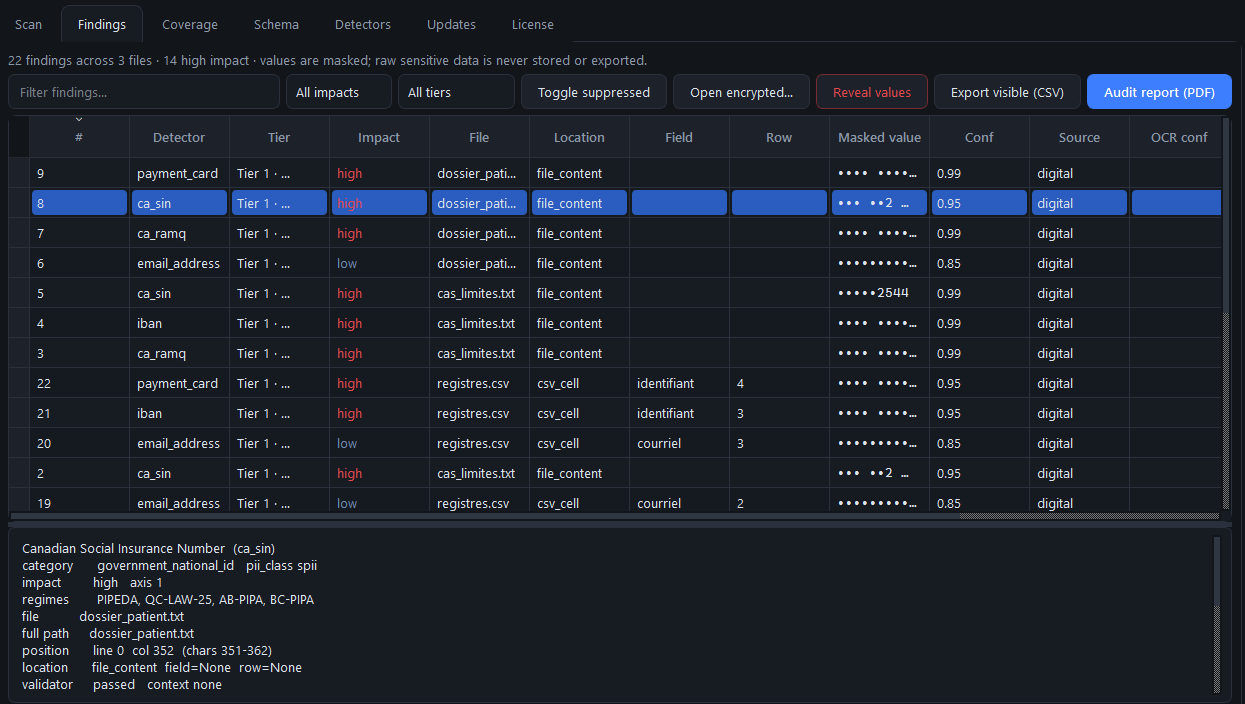
VellumSoft is built for privacy offices, IR teams and managed service providers. It runs on Windows 10/11 and keeps scanned data and findings on the machine. Four of its typical uses match MSP work: before a privacy impact assessment or audit, shared drives and mailbox exports, migrations and decommissioning, and incident scoping.
For repeat work, the suggested cadence is a quarterly scan of shared drives and departmental folders. Add a scan before and after any migration or decommissioning, mailbox exports included, and one straight away when a suspected incident needs scoping. The ten-step workflow (prepare, scan, review, act, prove) is the shape of the worked example above.
The audit report holds an executive summary with scan scope and timestamp, findings grouped by regulation, file-level locations, a coverage disclosure and a SHA-256 fingerprint of the exact results, with no raw values. A remediation owner should get a masked CSV filtered to their folders, and an executive sponsor the summary page.
Three limits shape the engagement. Each licence is node-locked to one machine, so a seat is tied to one workstation. The terms for using one seat across several clients are not yet published, so contact us before you plan client work on it. Version 2.0.2 does not read Word (DOCX), Excel (XLSX), ZIP or 7z files, which leaves those for conversion or a separate review. And VellumSoft does not redact or delete. The fix happens in the client's systems.
Partner terms
Partner terms are not yet published. The partner programme page will carry them when they are. For volume and site licensing, contact us.
Holding the results safely
A scan result is a map of where a client's sensitive data lives. Keep results in a local, access-restricted folder, never emailed, uploaded or on a synchronized drive, and only as long as remediation and evidence require. Whether a masked results file counts as protected health information is a question for counsel, since HIPAA's business associate wording turns on whether a provider creates, receives, maintains or transmits it1. Handing over the audit report and keeping nothing else is the simplest way to hold less.
This page explains the law in general terms and is not legal advice.
Questions
Is an MSP a HIPAA business associate?
It can be. HIPAA defines a business associate as a person who creates, receives, maintains or transmits protected health information on behalf of a covered entity, other than as a member of its workforce. An MSP that hosts or handles a clinic's patient data on its behalf fits that wording; the contract and the facts decide each case.
Does the FTC Safeguards Rule apply to an MSP?
The Rule binds financial institutions such as tax preparation firms, and it requires them to oversee their service providers, including by contract. An MSP serving those clients is a service provider under the Rule's definition when it can access customer information.
Who reports a breach that happens at a Canadian client's IT provider?
The OPC's view is that the principal organization generally keeps control of personal information it sends to a processor, so it reports a breach that happens there. The processor still has obligations under PIPEDA for the information in its custody, and the contract should cover breach reporting.
Can an MSP keep the scan results for its own records?
Results show where personal information sits in a client's files. Keep results local and access-restricted, and only as long as remediation and evidence require. Share the audit report rather than the results file.
Sources
- eCFR, 45 CFR 160.103, Definitions (HIPAA)Reviewed 16 Nov 2026
- eCFR, 16 CFR Part 314, Standards for Safeguarding Customer InformationReviewed 16 Nov 2026
- Strac, MSP DLP: How to Deliver Data Loss Prevention as a Managed ServiceReviewed 16 Nov 2026
- RapidFire Tools, HIPAA Compliance: An Rx for MSPsReviewed 16 Nov 2026