The audit report is a PDF built from one set of scan results. It holds an executive summary with scope and timestamp, findings grouped by regulation with counts per data type, file-level locations, a coverage disclosure, and a SHA-256 fingerprint of the results, with no raw values. The Coverage tab says what the scan could not read. Read Coverage first, because a result is only as complete as its coverage.
Build the report
- Load results. Run a scan, or reopen saved results with Open encrypted… and the passphrase.
- Click Audit report (PDF). Encrypted results prompt for the passphrase.
- Enter your organization's name for the report header.
- Save it to your evidence location, not to a Desktop that syncs to the cloud.
What each part of the report means
| Part | What it tells the reader |
|---|---|
| Executive summary | What was scanned and when |
| Findings by regulation | Counts per data type, grouped under the laws that commonly apply, with validation results |
| File-level locations | Which files to fix |
| Coverage disclosure | What the scan could not read |
| SHA-256 fingerprint | Which exact results the report came from |
The regulation grouping shows which laws commonly apply to each data type. Regime mapping is informational and is not legal advice. Your privacy officer or counsel decides what the obligations are.
Read the Coverage tab first
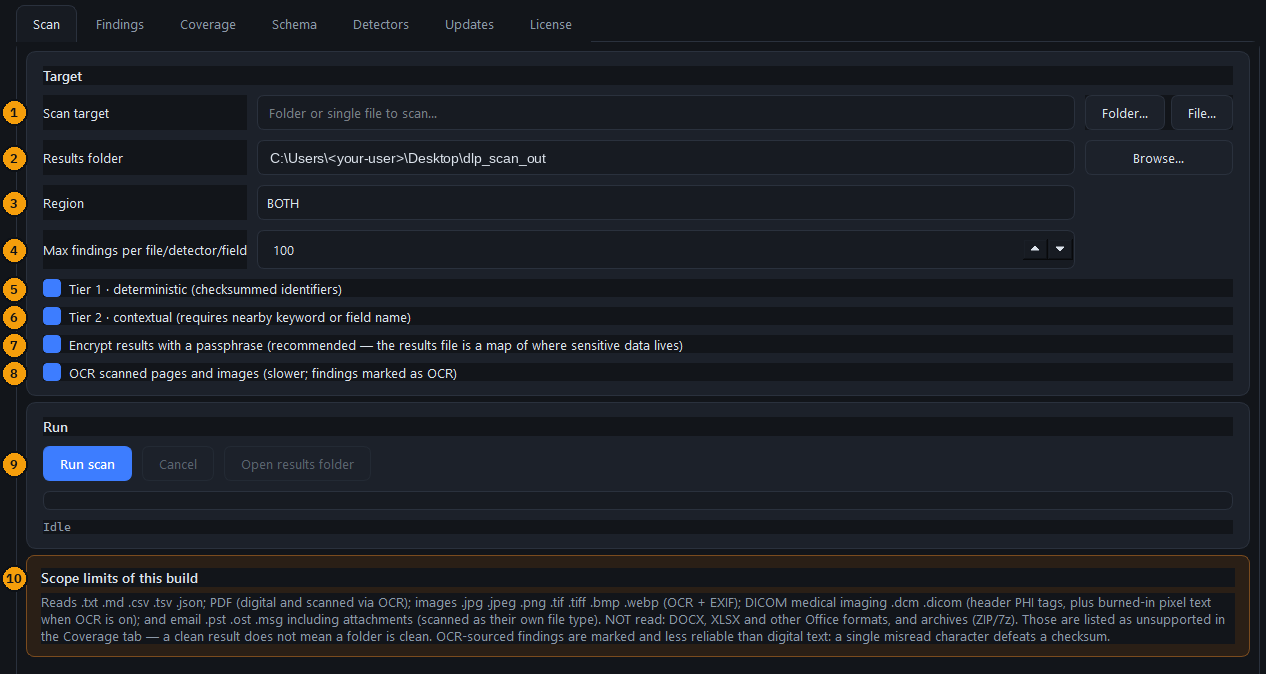
The screenshot shows the Scan tab. Its "Scope limits of this build" box says the formats that are not read are listed as unsupported in the Coverage tab, which is the third tab along.
The Coverage tab shows what the scan did not cover. It records three things:
- which tiers and detectors were turned off for the run;
- the file formats the scan met against the formats it supports, so skipped files are counted;
- every item whose extraction was not complete, such as password-protected or encrypted files, corrupt files and low-confidence OCR.
The rule is blunt. Zero findings alongside a list of unsupported files is not a clean result. Either bring those files into scope by converting or extracting them and scanning again, or record them as an accepted gap in the report.
What else sits in the results folder
A scan writes several files to the results folder. The encrypted findings file ends in .vsenc. A coverage file holds the coverage disclosure, and run files hold totals beyond the findings cap and read errors. Share the audit report rather than the results files, and keep results only as long as remediation and evidence require.
When the report is incident evidence
If the scan is scoping a suspected breach, keep the report with the breach file. For organizations under PIPEDA, the breach regulations say an organization "must maintain a record of every breach of security safeguards for 24 months" after it determines the breach occurred1.
Related pages
- Documentation
- Supported file types
- Offline and air-gapped activation
- Scan a PST/OST file
- Scan a mapped network share
Questions
Does the audit report contain the actual numbers it found?
No. The report holds no raw values, ever. Findings are shown masked, with only the last few digits of long identifiers, and the file paths that need clean-up.
Who should get the report and who should get the CSV?
Privacy officers, auditors and assessors get the PDF report, remediation owners get a masked CSV filtered to their folders or systems, and executive sponsors get the executive summary page. Nobody outside the review team gets anything without the privacy officer's approval.
What is the SHA-256 fingerprint on the report for?
It identifies the exact results the report was built from. If someone later asks which scan a report describes, the fingerprint ties the two together.