VellumSoft 2.0.2 reads plain text and data files (.txt, .md, .csv, .tsv, .json), PDF, common image formats, DICOM medical images and Outlook mail files (.pst, .ost, .msg). Version 2.0.2 does not read Word, Excel or other Office formats, and does not open ZIP or 7z archives. A scan of a folder full of them proves nothing, so check Coverage after every scan.
What version 2.0.2 reads
These are the formats version 2.0.2 reads, and how each one is read.
| Format | Extensions | How it is read |
|---|---|---|
| Text and data | .txt .md .csv .tsv .json | Structure-aware: CSV and TSV findings give the column and row, and column headers act as context |
| The digital text layer; scanned pages through OCR when OCR is on | ||
| Images | .jpg .jpeg .png .tif .tiff .bmp .webp | OCR of visible text, plus EXIF metadata |
| DICOM imaging | .dcm .dicom | Header PHI tags; burned-in text in the image when OCR is on |
| Email archives | .pst .ost .msg | Messages and their attachments; each attachment is read as its own file type |
For CSV and TSV files, a finding reports the column (Field) and the row. That makes an export of patient or staff records easy to trace back to the system that produced it.
What version 2.0.2 does not read
Version 2.0.2 does not read Word (DOCX), Excel (XLSX) or other Office formats, or ZIP and 7z archives. Those files are listed as unsupported on the Coverage tab after a scan.
The same rule reaches inside mailboxes. An attachment is read as its own file type, so a Word or Excel attachment in a PST file is not read either.
For unsupported files, convert Office files to PDF or CSV, or extract archives, and re-scan if they are in scope. If they stay out of scope, record them as an accepted gap.
Version 2.0.2 does not read EML or MBOX files.
Why a clean result is not a clean folder
Zero findings in a folder of files the scanner cannot open tells you nothing about those files. Personal information is personal information in any file type, and PIPEDA's safeguards principle says organizations "shall protect personal information regardless of the format in which it is held"1.
So read Coverage before findings. It lists the formats the scan met but could not read, and every item whose extraction was incomplete, such as password-protected, encrypted or corrupt files.
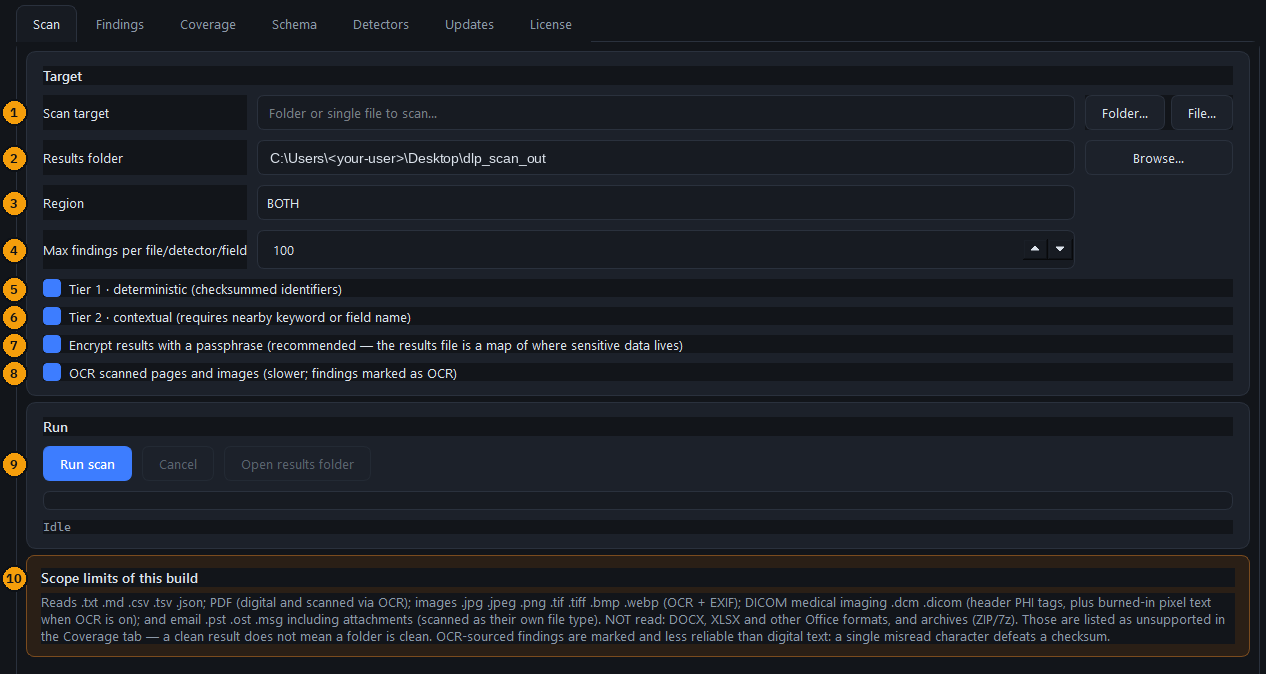
The Scan tab's "Scope limits of this build" box is the authoritative statement of what this version reads. Re-read it after every update.
OCR and scanned records
OCR (optical character recognition, reading text out of a picture) is a switch on the Scan tab. It reads scanned PDF pages, images and DICOM pixel data, runs slower, and produces findings that are less reliable than digital text.
Accuracy drops on handwriting and on low-resolution or skewed scans. One misread character can make a checksum fail, so an OCR scan can miss a real number as well as report a false one.
Related pages
- Documentation
- Offline and air-gapped activation
- Scan a PST/OST file
- Scan a mapped network share
- Read the audit report and coverage tab
Questions
Which Office formats are not supported?
Version 2.0.2 does not read Word (DOCX), Excel (XLSX) or other Office formats. Convert those files to PDF or CSV and scan again if they are in scope, and treat anything on the Coverage tab as unreviewed.
Are attachments inside a PST file scanned?
Yes. Messages and their attachments in PST, OST and MSG files are read, and each attachment is scanned as its own file type. By that rule, a Word or Excel attachment is not read either.
Which mail formats are not read?
Version 2.0.2 does not read EML or MBOX files. The mail formats it reads are PST, OST and MSG.
Is OCR on by default?
OCR is a switch on the Scan tab, used for scanned PDF pages, images and DICOM pixel data. It is slower, and OCR findings are less reliable than findings in digital text, so turn it on only where scanned records are in scope.