To find PII in images, a scanner has to read two things: the text in the picture, by optical character recognition (OCR), and the metadata the camera wrote into the file. VellumSoft reads .jpg, .jpeg, .png, .tif, .tiff, .bmp and .webp files by OCR of the visible text, plus EXIF metadata. Face recognition is outside its scope, so a portrait with no writing in it produces no finding.
Where image files with PII come from
Nobody sets out to build a folder of ID photos. A new hire photographs a driver's licence and a void cheque and emails both to payroll. A front desk scans health cards to JPG. A fax server saves every incoming referral as a TIFF. Someone takes a screenshot of a customer record to ask a question about it.
The office copier adds more. The FTC warns that "The hard drive in a digital copier stores data about the documents it copies, prints, scans, faxes, or emails"4. When that copier is set to scan to a network folder, the same pages land on a shared drive as image files or image-only PDFs.
A text search sees none of it. To a search tool, a photo of a Social Insurance card is a grid of coloured dots with a file name like IMG and a number.
Is a photo personal information?
Often it is, before any number is read out of it. NIST's guide to protecting PII lists "photographic image", especially of a face or other identifying characteristic, among its examples of PII2. HIPAA's de-identification standard lists "Full face photographic images and any comparable images" among the identifiers that must be removed before health information counts as de-identified3.
So an image folder raises two separate questions. One is whether the pictures contain identifiers as text, such as a licence number or a health card number, which is what an OCR scan answers. The other is whether the pictures are themselves records of identifiable people, which no text scan can answer and which someone has to judge from knowing what the folder is.
What EXIF metadata holds
EXIF is the metadata block a digital camera or phone writes into each photo. The Library of Congress keeps a reference list of the tags1. The ones that matter for privacy:
| EXIF tag | What the Library of Congress list says it holds |
|---|---|
| Artist | "Person who created the image"1 |
| CameraOwnerName | Camera owner name1 |
| BodySerialNumber | Camera body serial number1 |
| DateTimeOriginal | "The date and time when the original image data was generated"1 |
| GPSInfo | A pointer to the GPS data block, which the list describes as "for positioning information"1 |
A photo of a client's home taken for an insurance file can therefore carry who took it, when, and where, with no visible text at all.
What VellumSoft 2.0.2 reads in an image
The table sets out what version 2.0.2 reads from each image source.
| Image source | What is read |
|---|---|
| JPG, JPEG, PNG, TIF, TIFF, BMP, WEBP files | OCR of visible text, plus EXIF metadata |
| An image attached to a message in a PST, OST or MSG file | Scanned as its own file type |
| An image-only page inside a PDF | Read by OCR when OCR is on |
| DICOM medical images | Header PHI tags; burned-in text when OCR is on |
The Scan tab has an OCR switch that covers images along with scanned PDF pages and DICOM pixel data, so it needs to be on for an image folder. Findings read this way are marked with OCR as their source and carry the OCR engine's confidence beside them.
This page covers the image types in the table, and HEIF and GIF files are not among them. Which EXIF tags are checked, and whether every page of a multi-page TIFF is read, are not covered here.
HEIF matters because of phones. Apple says an iPhone 7 or later can capture photos in HEIF, that capturing in that format is recommended, and that a HEIF image can be exported to JPEG or PNG7. A folder of phone photos synced straight from an iPhone may therefore need converting before a scan can say anything about it. The Coverage tab, which lists formats the scan met and could not read, is where to check.
Where OCR on photos goes wrong
A phone photo is a harder target than a flatbed scan. OCR accuracy drops on handwriting and on low-resolution or skewed images, and a single misread character defeats a checksum. A card number or Social Insurance Number read with one wrong digit fails its check and may not be reported.
OCR can miss real values as well as produce false ones. Where a common confusion is repaired, such as the letter O read as zero, and the value then validates, the detail panel says so and the confidence is reduced. Low-quality items are flagged as low-confidence rather than silently passed.
Our advice for image folders:
- Scan image-heavy folders separately, with OCR on only where it is needed, because OCR is the usual cause of a slow scan.
- Treat every OCR finding as a lead and look at the picture.
- Read the Coverage tab, which records low-confidence OCR as an item whose extraction was not complete.
Running an image scan
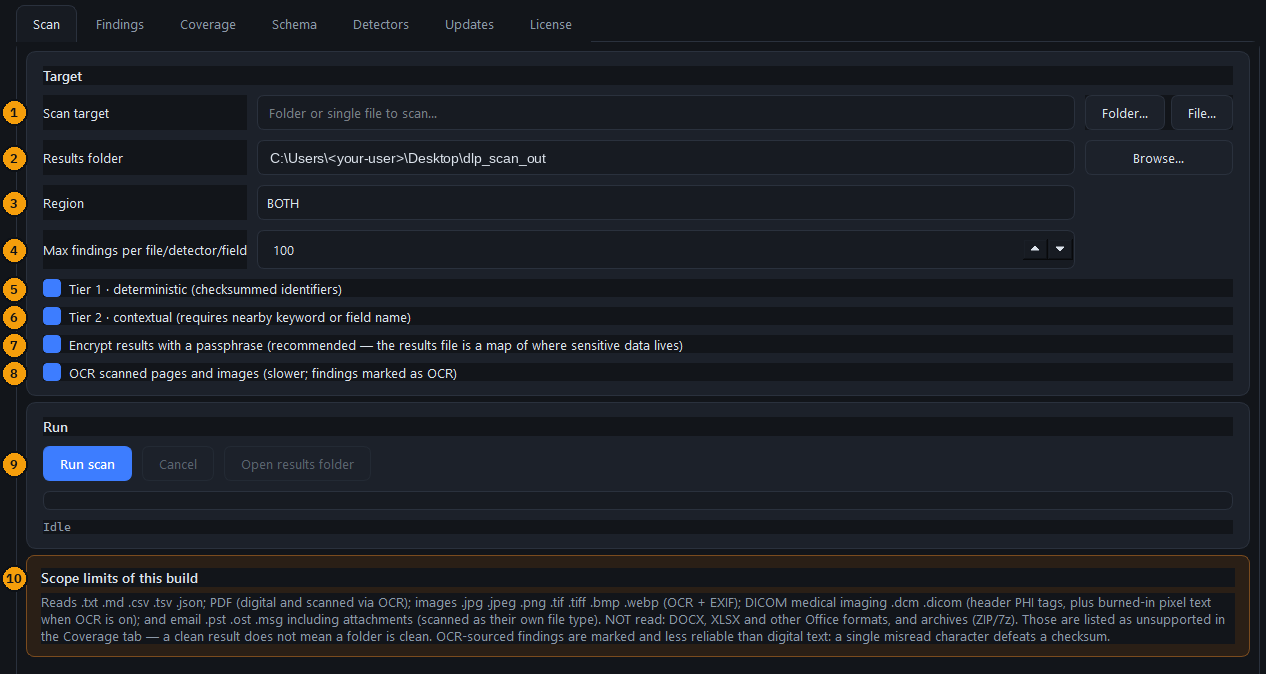
Point the scan target at the folder of pictures, set the results folder to a new local folder, turn OCR on and run the scan. Then open Coverage before the findings. For each finding, the detail panel gives the file's full path, and images open in their Windows default application when a finding is double-clicked.
How other tools describe images
Two rival pages show what else is on the market. PII Tools advertises "automatic face recognition in images, such as passports and government IDs"6. PII Crawler's docs say "A photo taken with a phone is turned the right way up first" and that a multi-page TIFF from a scanner or fax is read page by page5.
Neither page discusses what EXIF metadata holds, or the point that a photograph can be personal information with nothing in it for OCR to read56. For a folder of portraits or site photos, a tool with face recognition is the better fit. VellumSoft does not redact or delete, and its scope is text in the image and EXIF.
Photos of ID documents are covered under driver's licence and passport numbers, scanned paperwork under PDFs and scanned documents, and medical images under DICOM files. Image attachments in old mail are on the PST, OST and MSG page. Two more source pages cover shared drives and NAS and CSV and JSON exports, with the whole list under supported files and sources and the full workflow on how a scan works.
The folder to check first is the one the copier scans to.
This page explains the law in general terms and is not legal advice.
Questions
Can a scanner find a face in a photo?
Some products advertise face recognition. VellumSoft does something narrower: OCR of the visible text in an image, plus its EXIF metadata. A portrait with no writing in it gives OCR nothing to read, so it produces no finding, even though a photograph of a face can itself be personal information.
What personal information is in EXIF metadata?
EXIF is the block of data a camera writes into a photo file. The Library of Congress tag list includes the person who created the image, the camera owner's name, the camera body serial number, the date and time the image was generated, and a pointer to GPS positioning information.
Are iPhone photos in HEIF format read?
VellumSoft 2.0.2 reads JPG, PNG, TIFF, BMP and WEBP images, and HEIF is not among them. Apple says a HEIF image can be exported to JPEG or PNG, and that an iPhone can be set to capture in the more compatible JPEG format.
Does the scan blur or redact what it finds in an image?
No. VellumSoft does not block, quarantine, delete or redact. A finding points to the image file and the kind of identifier in it. Cropping, redacting or deleting the picture is done in an image editor or in the system the picture belongs to.
Sources
- PII Crawler Docs, Supported File TypesReviewed 16 Nov 2026
- PII Tools, File formatsReviewed 16 Nov 2026
- Apple Support, Using HEIF or HEVC media on Apple devicesReviewed 16 Nov 2026